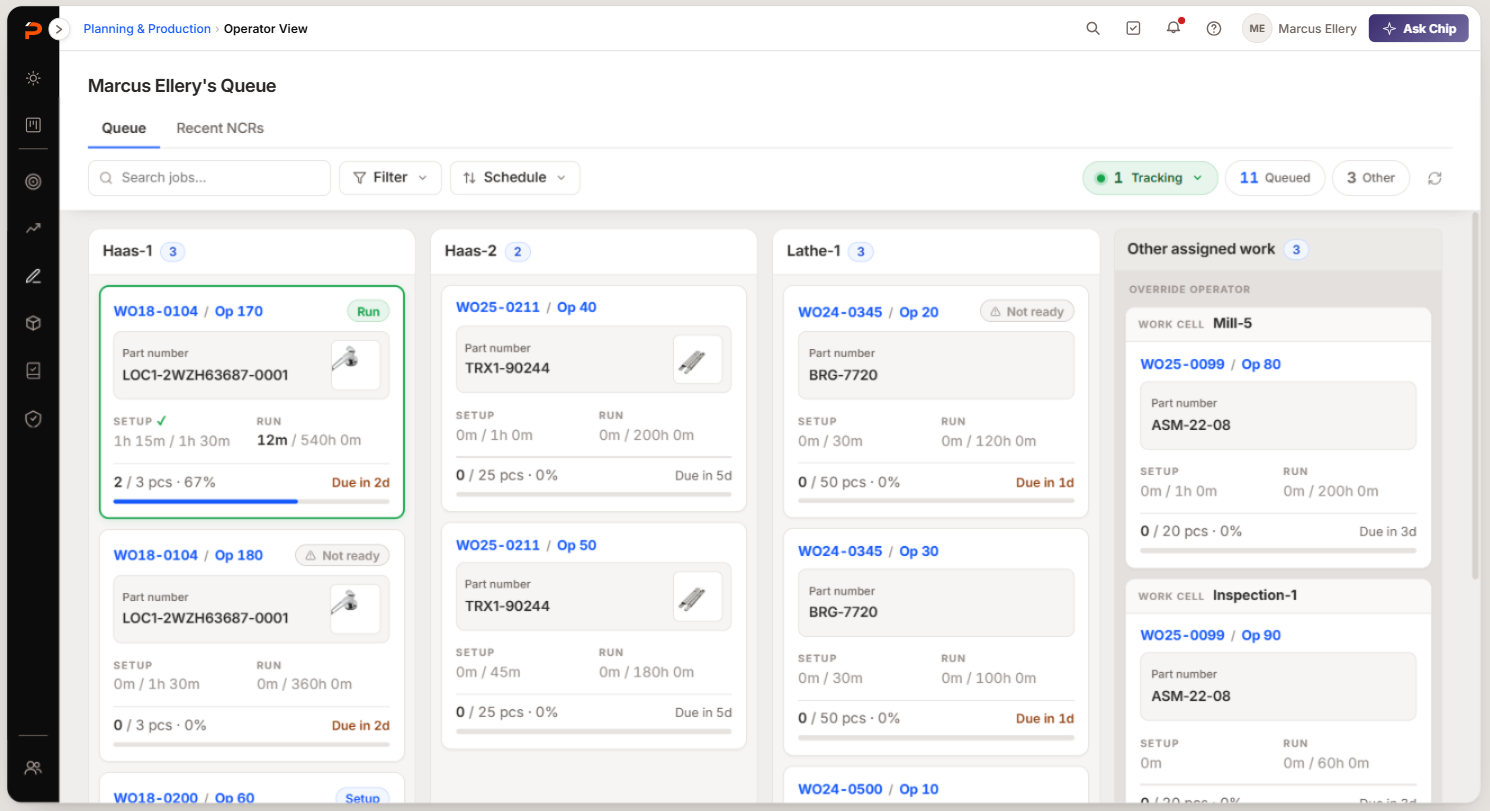
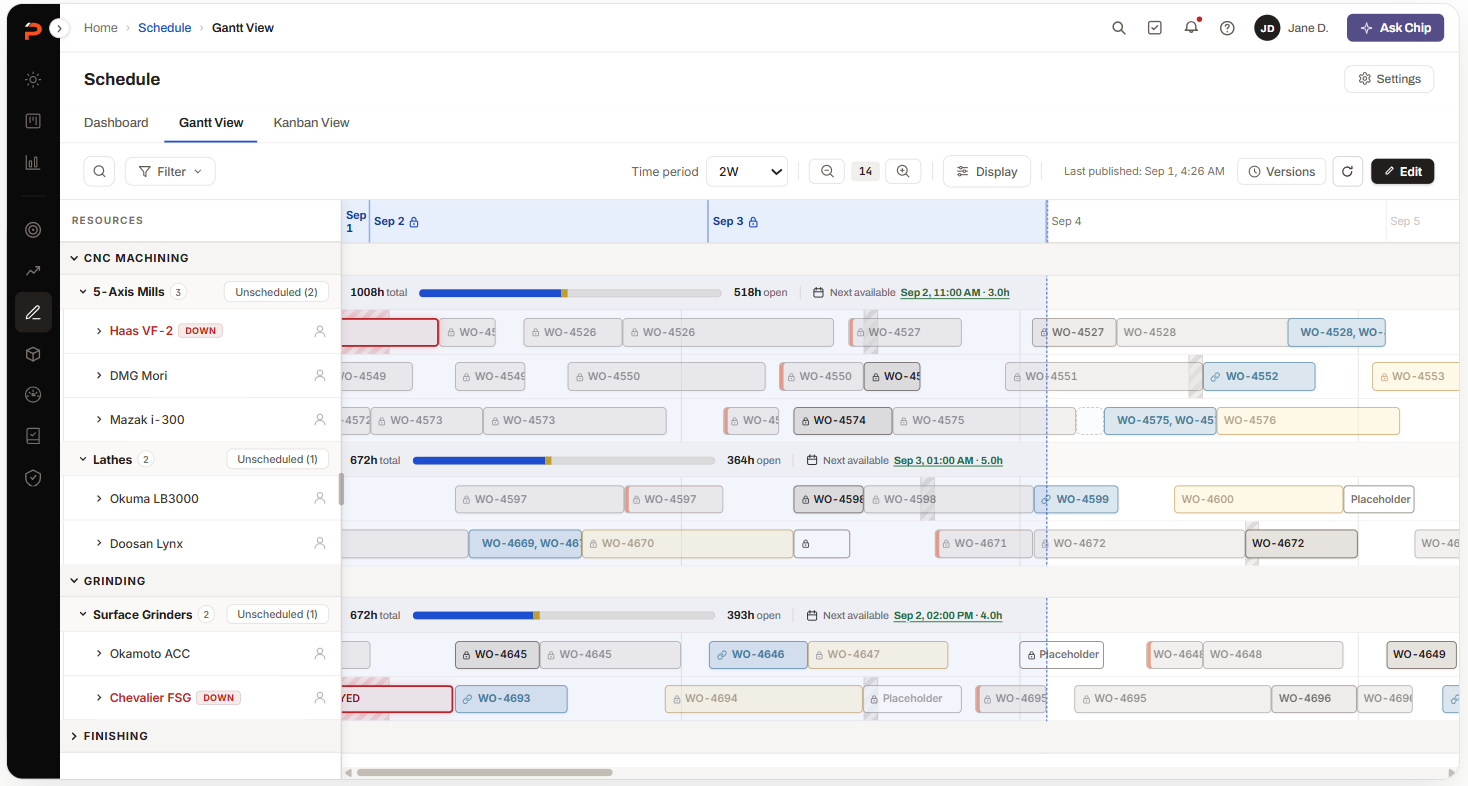
Production Schedule
Rebuilding the heart of a manufacturing ERP.
Production scheduling decides what every machine and every person in a shop does next. In our product it had become a tool one person per shop knew how to drive, and when that person was away, the schedule waited for them.
I was handed a UI face-lift. After time with schedulers I was sure the problems they described lived in the data model, not the screens, so I took two costed paths to the VP — polish now, or foundation first. She chose foundation.
This is the rebuild that followed: planning, the shop floor and the numbers leadership reports on, designed as one scheduling system rather than screens that each knew half the story. It ships to every account in September 2026.
Why scheduling is the hardest problem in a machine shop
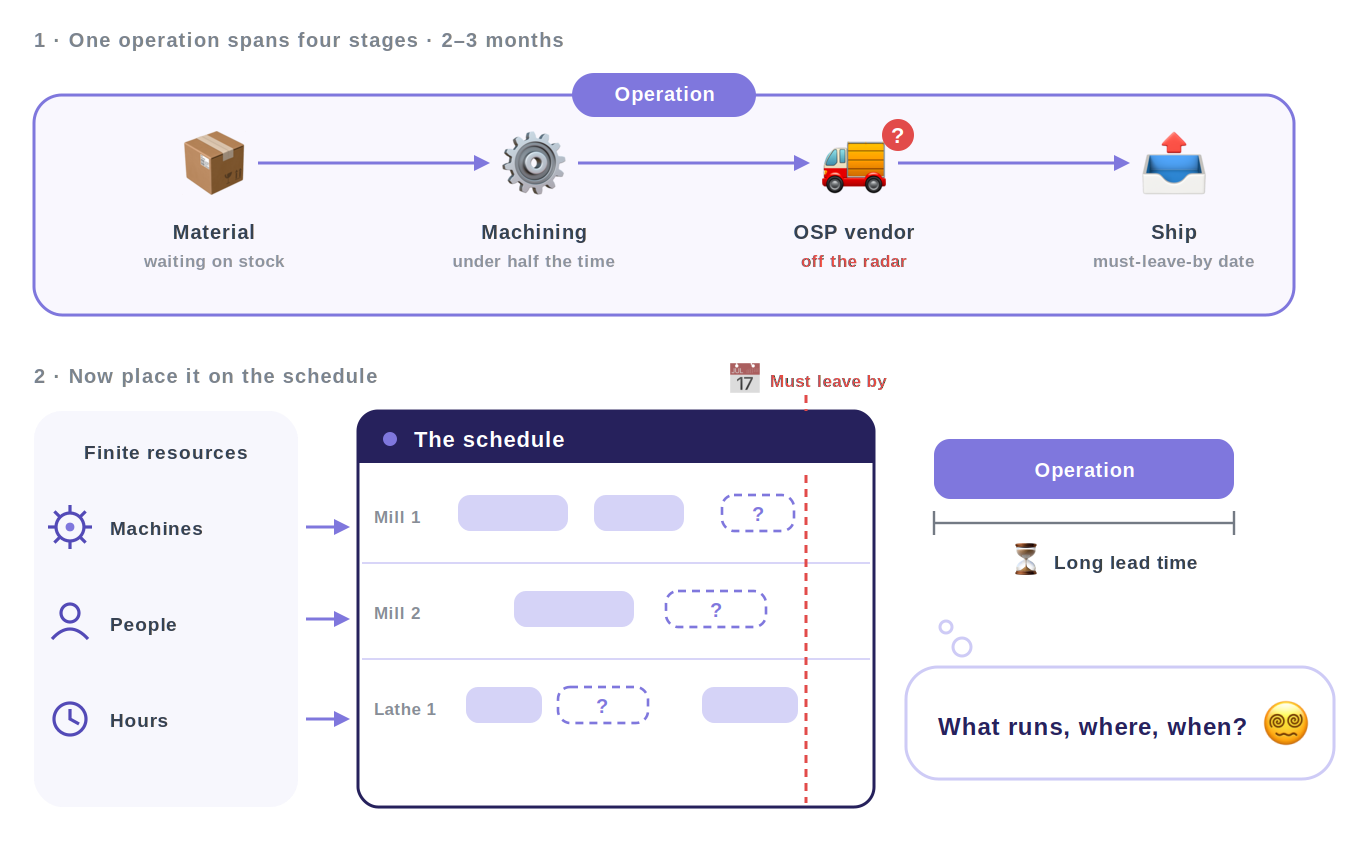
The core business question: given finite machines, people and hours, in what order should every operation run so that every part leaves on time?
A part takes two to three months to make, and machining is less than half of that. The rest is material, inspection, outside processing at a vendor the shop can’t see into, assembly and shipping — each with a hard must-leave-by date. One late arrival cascades through everything behind it.
What failure actually looks like
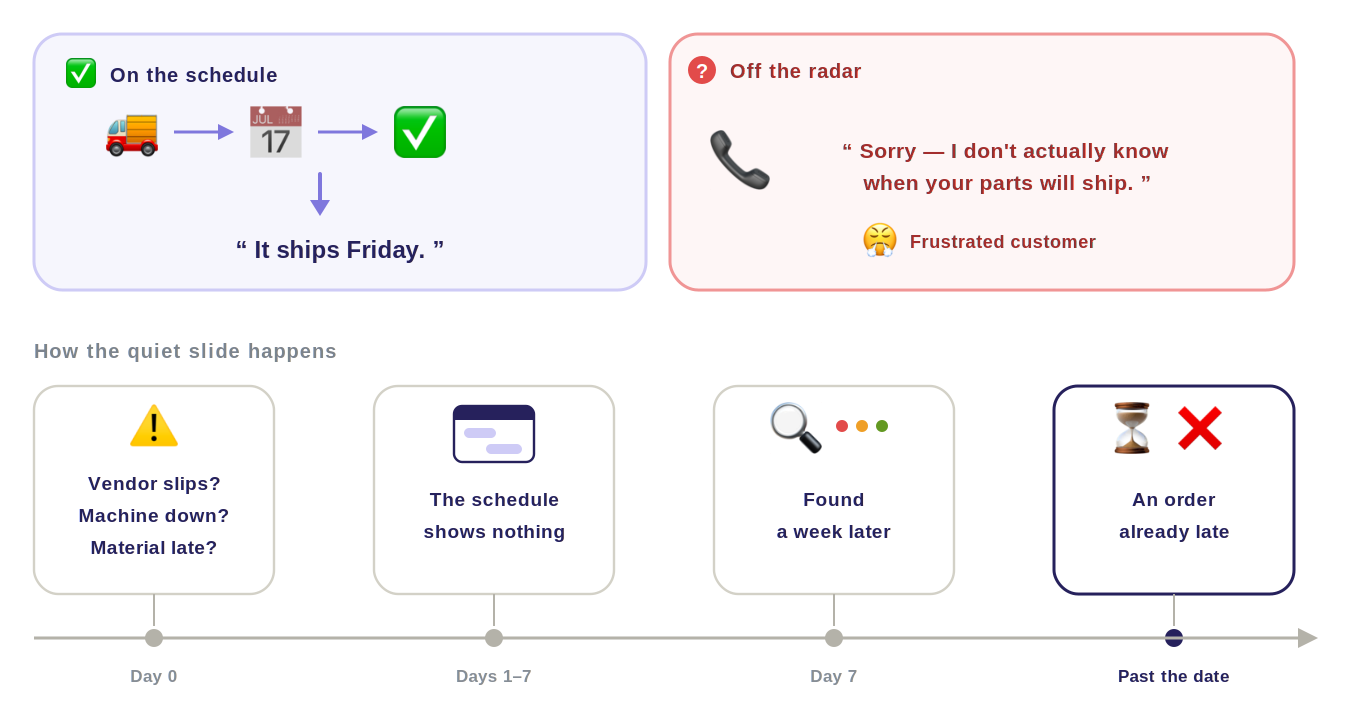
It doesn’t look like an error. A promise slips by a few days, nobody is told, and a week later a customer calls.
Pendo, 30 days to 20 Aug 2026. Scheduling is daily use for most accounts, not a niche module.
Four questions a schedule has to answer
The legacy schedule was genuinely powerful, but only one person per shop had learned to drive it. That made the most important screen in the product a single point of failure.
When I sorted everything I’d heard, it came down to four things a schedule has to get right: what a job needs, when a machine can actually run, how work gets placed, and whether each person can see it at the level they work at. I call them Resources, Time, Method and Visibility, and I’ve organized the rest of this case study around them — every finding and every screen below belongs to exactly one.
“The schedule is a lie.”
Not one shop’s bad day — the same sentence, from different shops, in NPS comments about the module they depend on most.
-
P1 Resources · what does this job need?
The machine is the only constraint
People, skills, material and outside processing don’t exist on the schedule — so a plan can be “correct” and still unrunnable.
NPS detractor analysisWhere “the schedule is a lie” came from, read at volume so a vivid quote couldn’t pass as a pattern. 12+ interviewsPower users from Pendo’s top-editor list, plus novices and people who had given up. Sampling only the 294 who can edit would have confirmed the tool rather than tested it.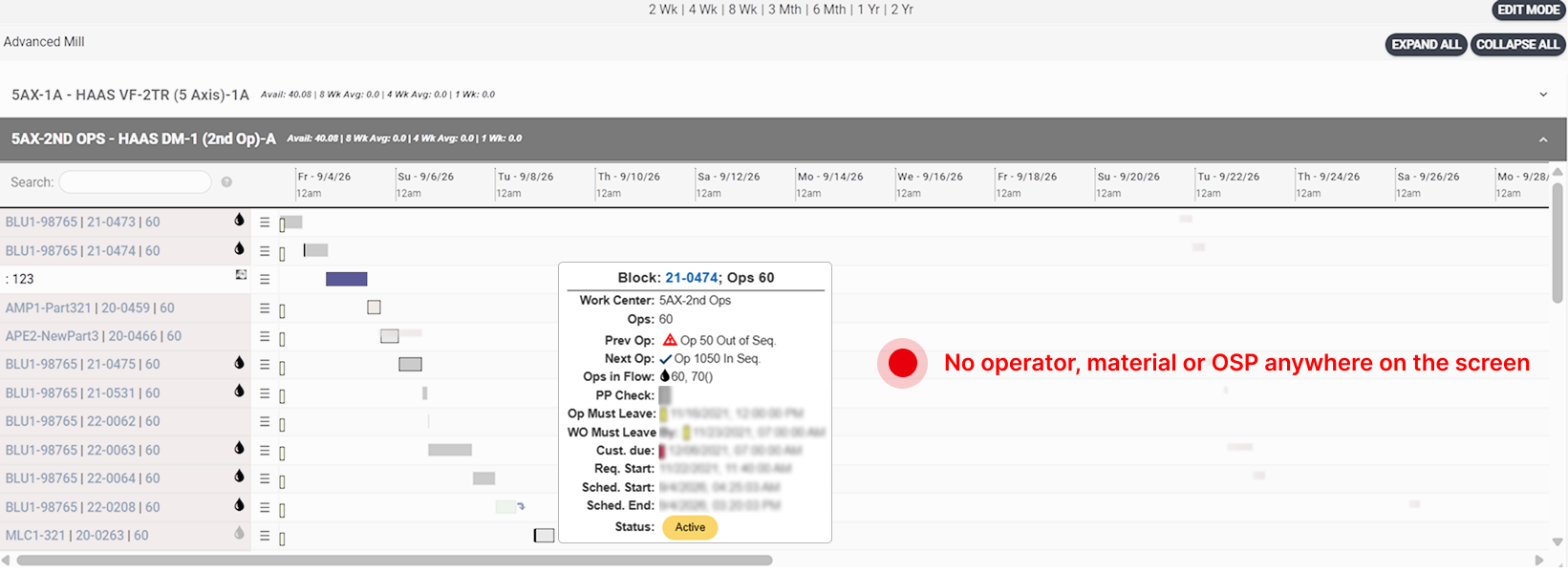
-
P2 Time · when can it actually run?
Capacity by subtraction
Availability is carved out of each machine by hand — no shifts, no holidays, no bulk apply, and a silent two-year expiry. Every date on the board rests on a calendar nobody trusts.
Tickets against usage dataInterviews say what hurts; Pendo says how many people it happens to. Neither one is sufficient to prioritize against. 12+ interviewsPower users from Pendo’s top-editor list, plus novices and people who had given up. Sampling only the 294 who can edit would have confirmed the tool rather than tested it.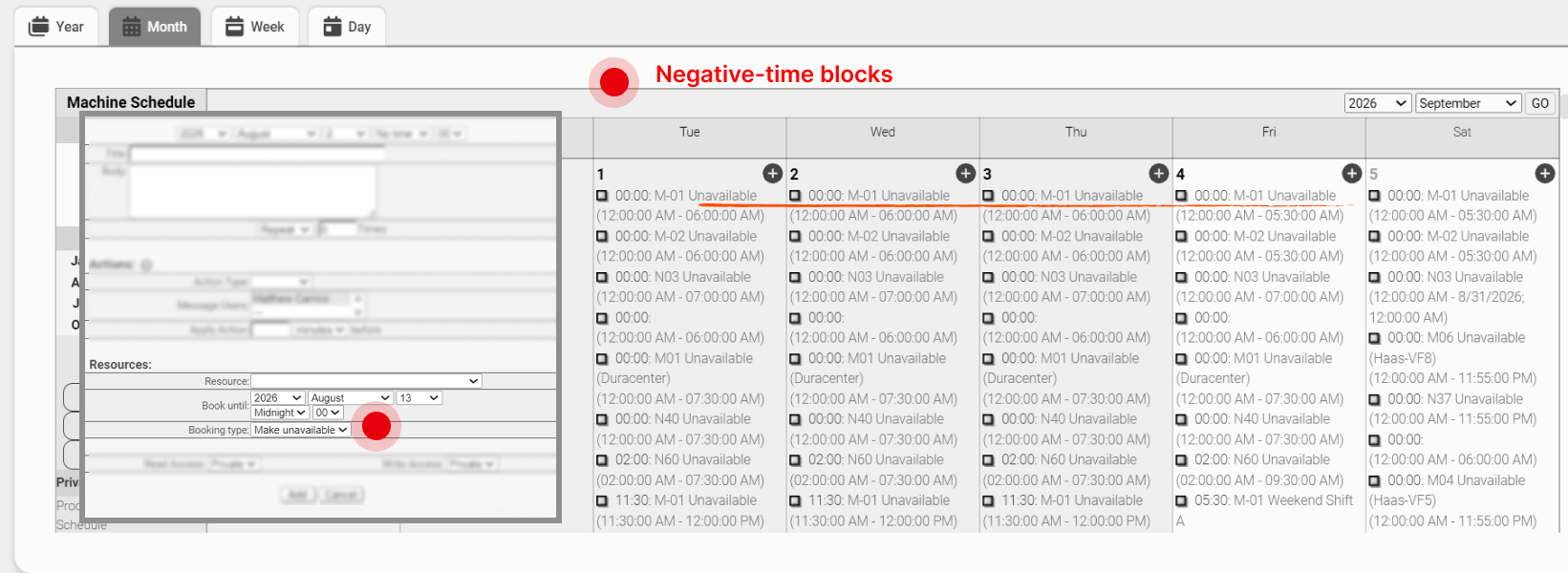
-
P3 Method · how does work land?
Placement by hand
One job per machine, sequence unenforced, a hard date the only lever — so schedulers faked concurrency with ghost jobs, work orders that don’t exist.
12+ interviewsPower users from Pendo’s top-editor list, plus novices and people who had given up. Sampling only the 294 who can edit would have confirmed the tool rather than tested it.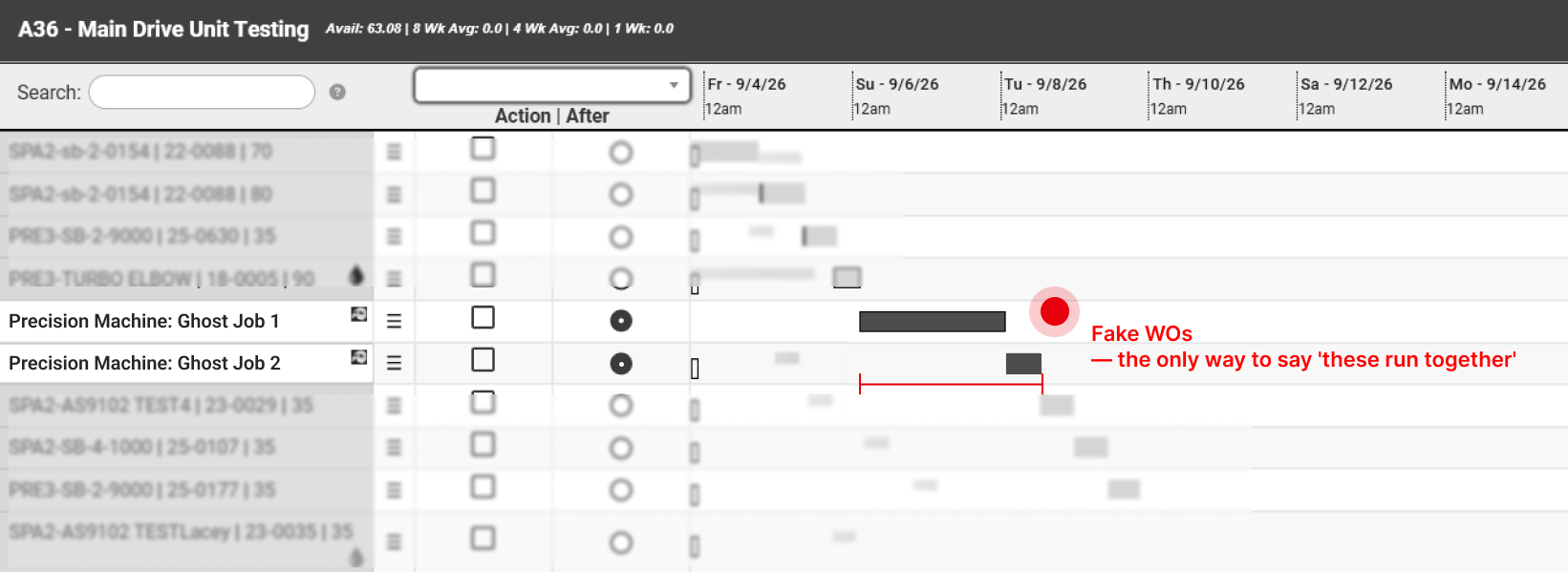
-
P4 Visibility · where is this job, and what’s happening?
One zoom level
Everything at the granularity of one operation, nothing above it and no path down — so every role expands cards just to read a status.
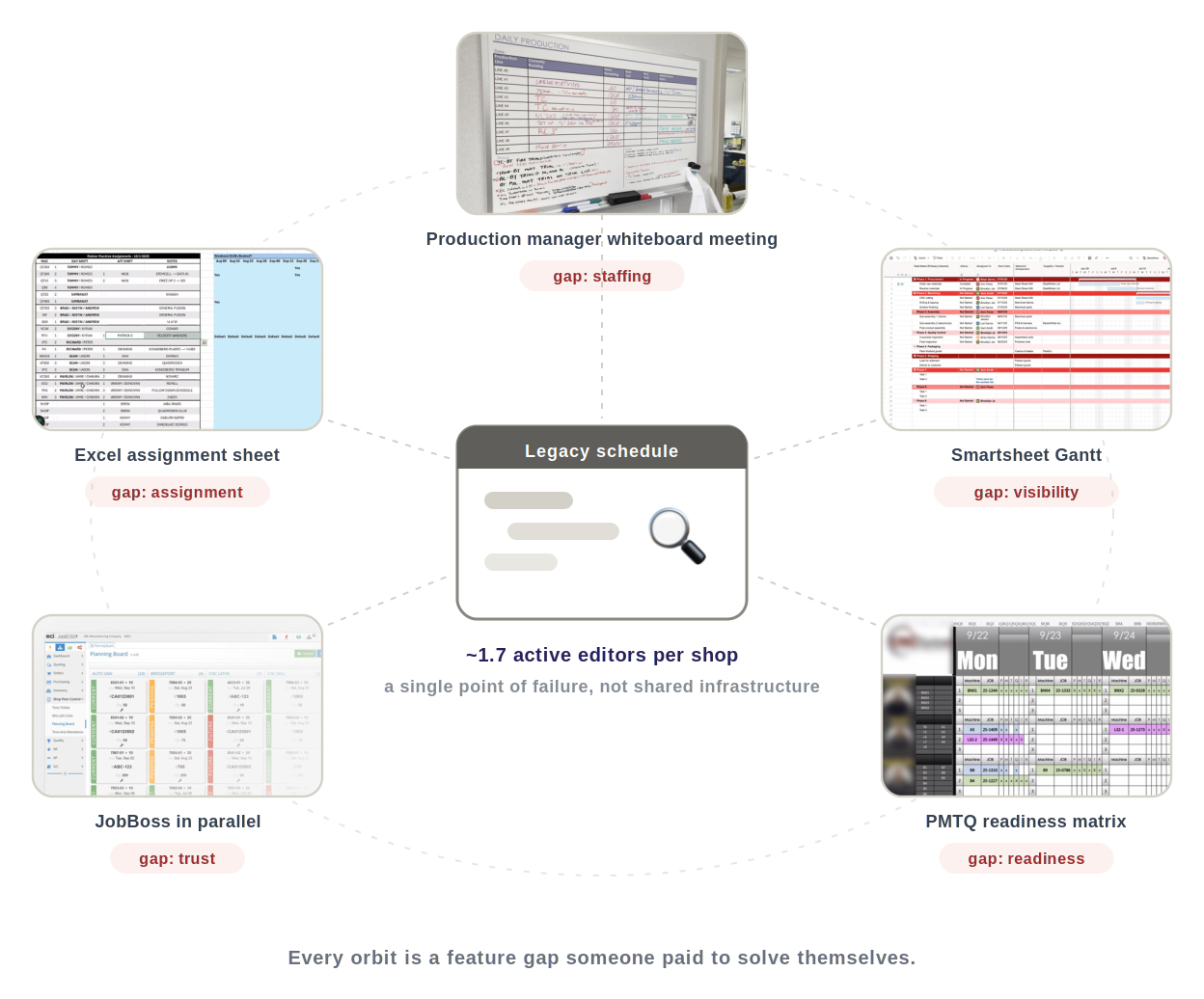
Contextual inquiryOnsite, watching the shadow systems get used: the whiteboard meeting, the monitor in the corner. Nobody reports a workaround in an interview, because to them it isn’t one.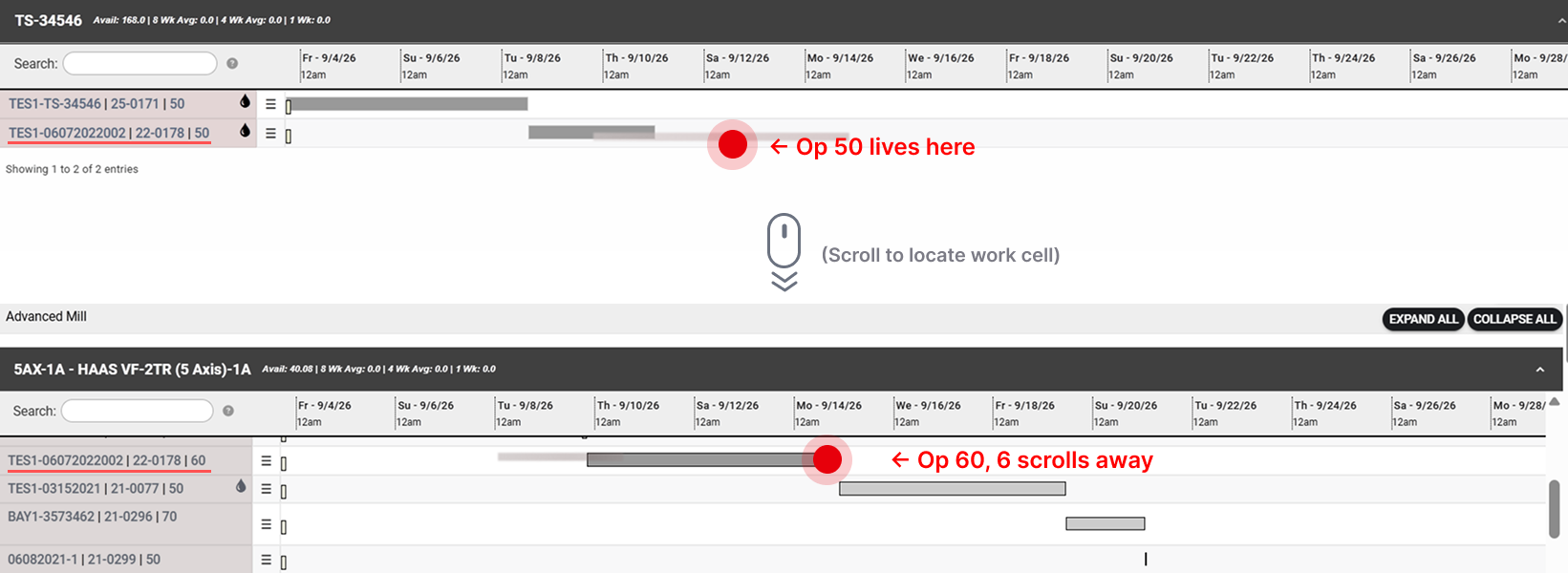
The same gap, in numbers
The usage data tells the story the quotes tell.
Support tickets from the same weeks say it a third way — work orders silently missing from the schedule, maintenance utilities reporting “success” with no diagnostics. Heavy dependence, fragile trust. These are the baselines every post-beta result gets measured against.
How might we turn the schedule from one expert's tool into shared shop infrastructure — so anyone can see, trust and act on it?
What I needed to find out first
Two numbers didn’t add up: 65.6% of accounts opened the schedule, and 7.5% of those users ever edited it. Nobody could tell me why — it could have been permissions, training, trust or the interface.
I only had budget to answer questions that would change what we built, so I kept the ones with a fork in them: two plausible answers that lead to two different products. Three passed that test.
-
Q1
Is the schedule wrong, or just hard to use?
DecidesFace-lift, or foundation
-
Q2
Who else needs it — to see, or to act?
DecidesOne workspace, or several
-
Q3
Where is the real plan actually kept?
DecidesWhich constraints join the model
Four sources, each covering the last one’s blind spot
Interviewing only power users would have given me a faster version of the same tool. The people who’d given up on the schedule are the ones who explain the 1.7 editors, so I paired each source with one that would catch what it missed.
Evidence matrix
| Finding | NPS | Jira | Interviews | Onsite |
|---|---|---|---|---|
| The schedule can’t be trusted to match realityThe symptom. Every finding below is one of its causes. | 3 | 6 | 2 | 1 |
| F1Shops think in departments and machine familiesP1 | — | — | 4 | 1 |
| F2People, material and OSP decide the schedule — and can’t be seen on itP1 | — | 1 | 7 | 2 |
| F3Availability is the friction point, and it driftsP2 | — | 1 | 3 | 1 |
| F4Open capacity can’t be seen or soldP2 | — | 2 | 3 | 1 |
| F5Op sequence is enforced by handP3 | — | 2 | 2 | — |
| F6Concurrent running is modeled wrongP3 | — | 2 | 3 | 1 |
| F7You see one machine at a time, never the shopP4 | 2 | 2 | 4 | 2 |
| F8No overview and no drill-downP4 | 1 | 2 | 3 | 1 |
Dot size is how many pieces of evidence back a finding in that source. NPS is silent on six of eight: it says scheduling is broken, not what’s broken.
NPS verbatims
“The UI needs a lot of updating, the scheduling needs a lot of updating…”
“The scheduling portion is unusable for our company. Upgrades seem to more appearance an less for function.”
“Great information. Just needs a good GUI for visualization of work cell scheduling and shop work flow.”
“Would like to see a bit more AI tools within the software (i.e. scheduling), scheduling would be better to be more visual and click & drag.”
“Down from a 10 due to the scheduling being quirky.”
Pendo — five accounts, six responses, sorted by score.
Jira feedback and tickets
Product feedback
Scheduling enhancements — sequence dependency, WO Gantt, priority-aware auto-schedule, drag-to-reassign
Ouroboros Space (OUR1) · May 2026 · proposed
Assign users to a scheduled resource
All clients · 19 shops tagged incl. Moseys, Trulife · in discovery
Add sequential op # order dependency
Sales-driven · all customers with multi-op WOs
Schedule work orders to run concurrently
Cells, pallet machines, additive segment
Create condensed schedule overview
Buyken · large shops
Schedule summary (availability) show running
Estimating, quoting, CSR
Schedule view — all resources expanded, no white space
All users · re-platforming scope · backlog
Support tickets
Orphaned or corrupted schedule records2 tickets
Redline Chambers (RED1) · resource-less calendar entry cannot be deleted, no master-week link · 28 Aug 2026 · high
Die Craft Machining (DIE1) · invalid return diving into schedulequeue on machine H08 · 24 Aug 2026 · blocked
Work orders or operations missing from schedule3 tickets
Kennewell (KEN4) · WO not appearing on machine schedule after routing correction · 5 Aug 2026 · highest
Hawk Machine (HAW2) · operations not displaying, resource 2100 scheduleIDTable missing value · 16 Jun 2026
Sealth · scheduled work queues returned no results across work cells though WOs were scheduled
Direct schedule manipulation fails1 ticket
Alloy Concepts (ALL2) · drag and drop error on machine schedule · 11 Jun 2026 · high
Seven product-feedback ideas, and six support tickets clustered into three themes.
Interview notes
Moseys
10 Jun 2026
Concurrent run, multi-machine mosaic
Flying S
Andrew · 18 Nov 2025
Better insight into what’s preventing an order from starting — part stock, BOM (COTS, parts), outside process
Tesseca CA
Karla · 16 Oct 2025
Group “like” machines; visibility into outside processing when it precedes machining
Rhine Machine
Tyler, operations manager · 3 Oct 2025 · open to alpha testing
Master week available time; vacation time; work cell assignment whiteboard
Mahler Machining
Michael O’Neill, production coordinator · 1 Oct 2025
Target time vs current / actual time
CNC Swiss
Jay & Bogda, production + quoting · 29 Sep 2025
Grouping machines before assigning WOs; users as a constraint
Second session: better insight on first available machine — “selling the gap”
Machine Science
Malcolm, scheduler · 29 Sep 2025
Grouping before assigning machines; concurrent run; capacity by department / group / machine; intelligent placement by date
Truline Industries
25 Sep 2025 · early adopter, not yet on the schedule
Grouping before machine assignment; flag hot jobs
Coastal Machine & Supply
Kody · 24 Sep 2025
Visibility of jobs at inspection or OSP, using the QQ next-op icon
Confluence — nine shops, September 2025 to June 2026.
Onsite photographs
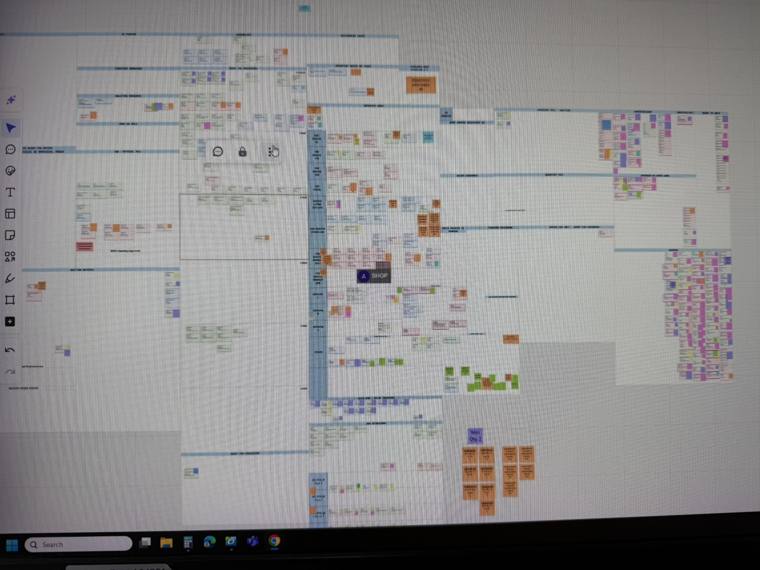
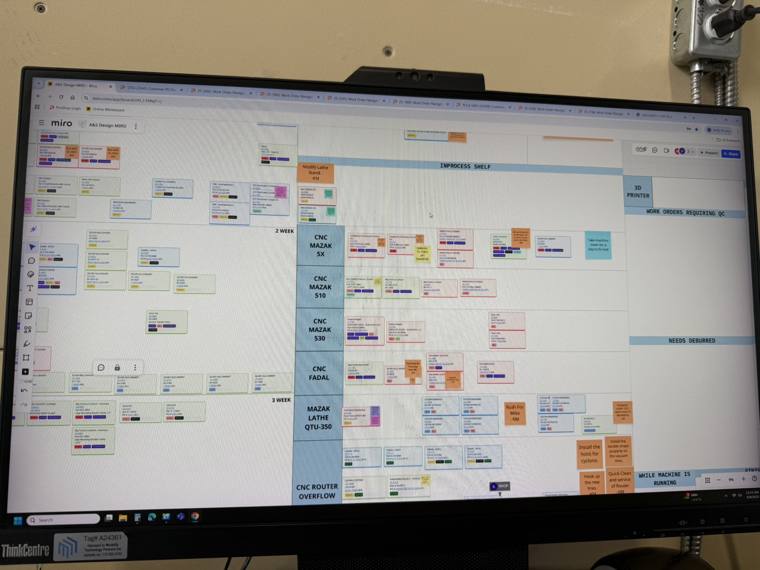
A&S Designs
Abbotsford BC · 9 Sep 2025 · Kyle McHardy, owner
They don’t use ProShop’s Schedule at all — they built their own in Miro. Every board like it is a specification somebody already paid to write.
Post-its carry anything you’d normally text or DM someone about a job, and they stay with the WO block.
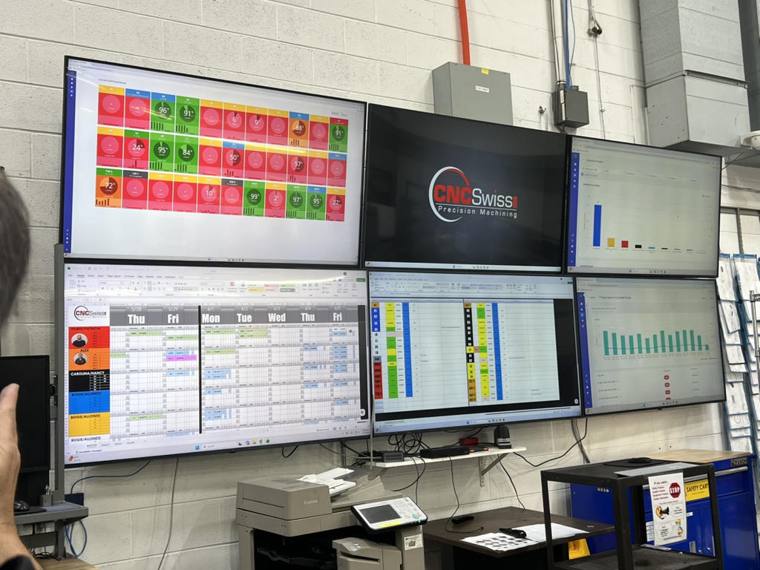
CNC Swiss Inc.
Bloomingdale IL · Jun 2026 · Jay Boryscka · 34 machines, 3 shifts
They built their own Excel dashboard, pulling via API to see sellable open slots per machine.
Three photographs across two shops, from the client onsite tour notes.
Eight findings, two per failure
Each card is one thing I heard often enough to trust; the sketch under it is the shape of the answer it implies — the principle, not the feature. The four design chapters each pick up their pair.
ResourcesWhat does this job need?
-
F1
Shops think in departments and machine families
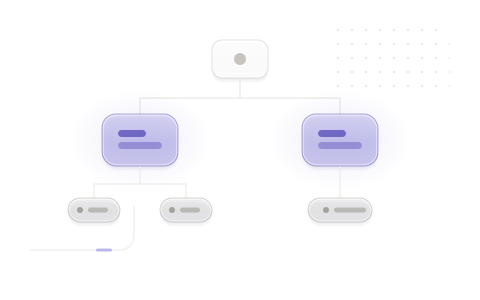 So: a hierarchy the shop already talks in
 -
F2
People, material and OSP decide the schedule — and can’t be seen on it
“90% of our work goes to OSP — and it’s invisible on the schedule.”
on outside processing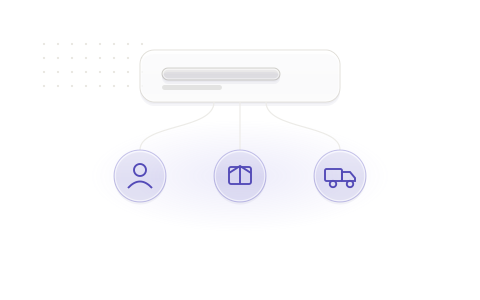 So: constraints carried on the block itself
TimeWhen can it actually run?
-
F3
Availability is the friction point, and it drifts
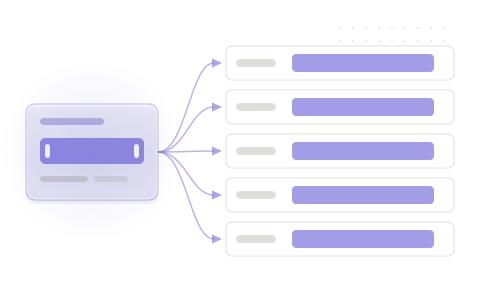 So: working time declared once, positively
 -
F4
Open capacity can’t be seen or sold
“Selling the gap.”
on quoting from open machine time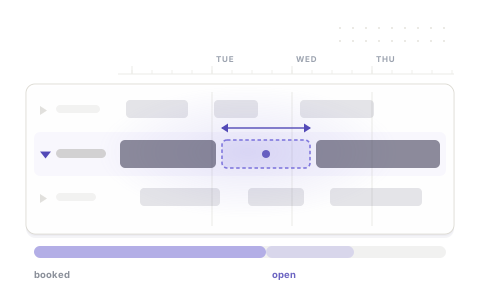 So: open capacity as a computed figure
MethodHow does work land?
-
F5
Op sequence is enforced by hand
“We lock the schedule Thursday at 5 PM… then juggle it all week.”
on what “the plan” means in practice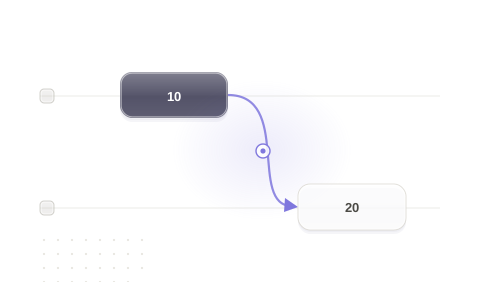 So: routing order as an invariant
 -
F6
Concurrent running is modeled wrong
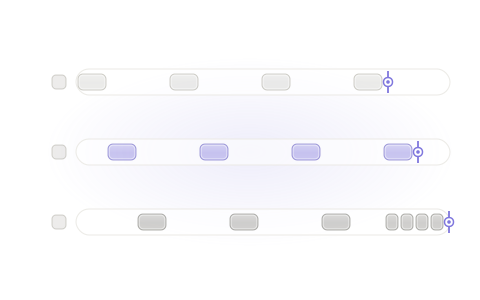 So: time-dilated bars
VisibilityWhere is this job, and what’s happening?
-
F7
You see one machine at a time, never the shop
“I need to see the entire mosaic.”
on flipping between per-machine views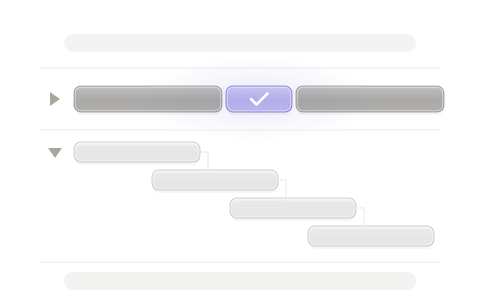 So: one continuous canvas
 -
F8
No overview and no drill-down — every role digs through cards
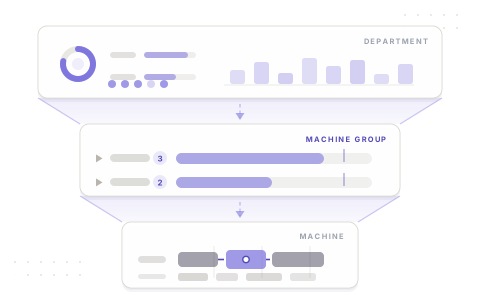 So: one tree, any altitude
From face-lift to foundation
Nobody handed me a rebuild. The brief was six feature PRDs on the existing skeleton, and nobody had asked whether the skeleton could carry them. I task-tested the legacy workflows to find out: the six would have shipped as plug-ins, with every frustration underneath them intact.
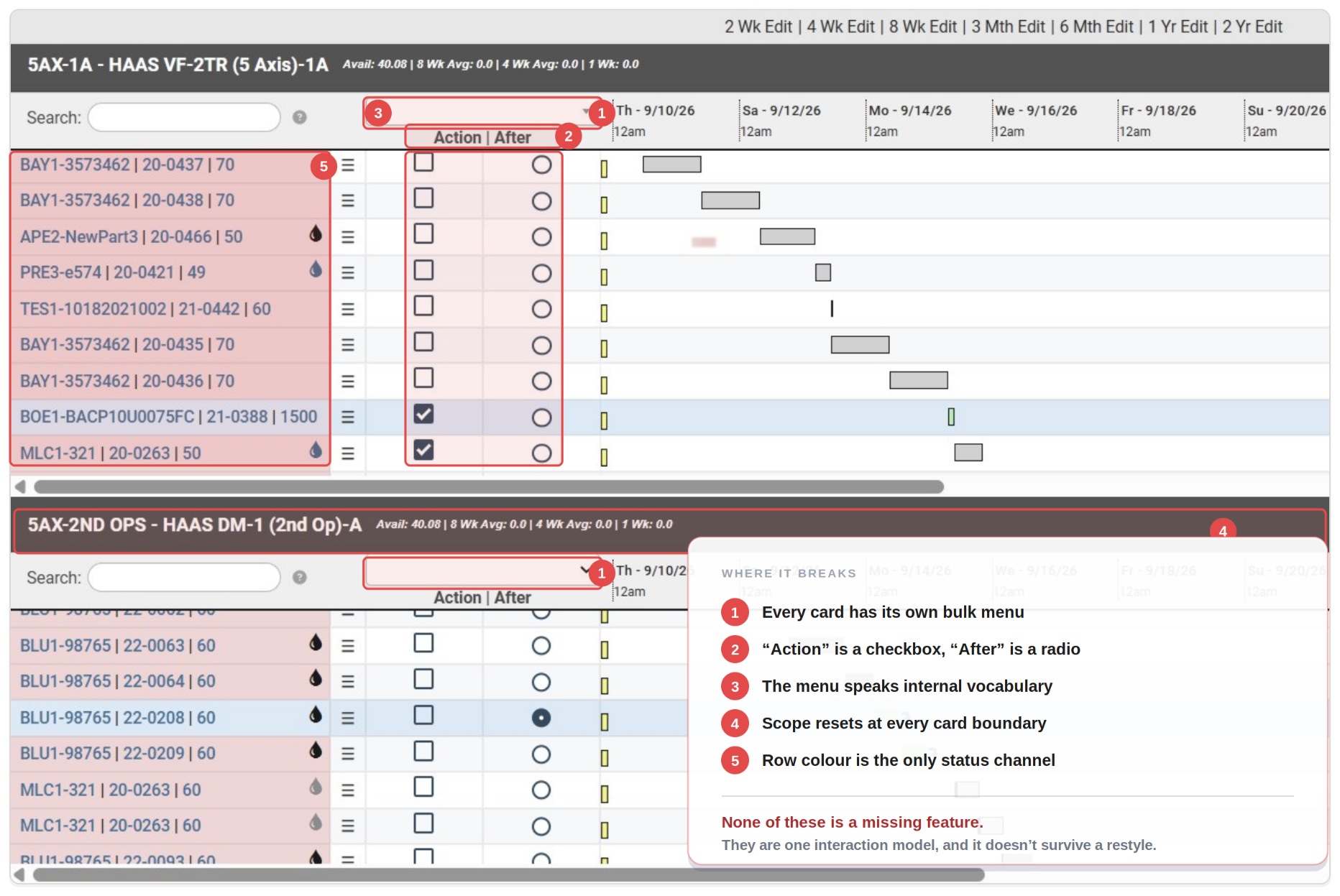
So I made the case for a different question. With the PM I ran a short prototype sprint to show how far the current model sat from what we wanted next, then brought the VP two costed paths — face-lift now and overhaul later, or foundation first. She chose foundation. Engineering re-estimated alongside us and found that replicating legacy saved nothing; its component patterns were reusable either way.
How might we spend an extended scope on the foundation the next five years need — not the six features the brief asked for?
Scoping the V1
Once the scope opened, the risk flipped to doing too much. I gave every candidate one test: which pillar does this strengthen, and is that pillar ready to carry it?
I ran the sort with the PM and the roadmap owners — Usability Fixes, NextGen, Not Right Now — and eight workstreams made V1. Target-vs-actual time didn’t: it depends on Machine Monitoring, and I wasn’t going to put a dependency on the critical path.
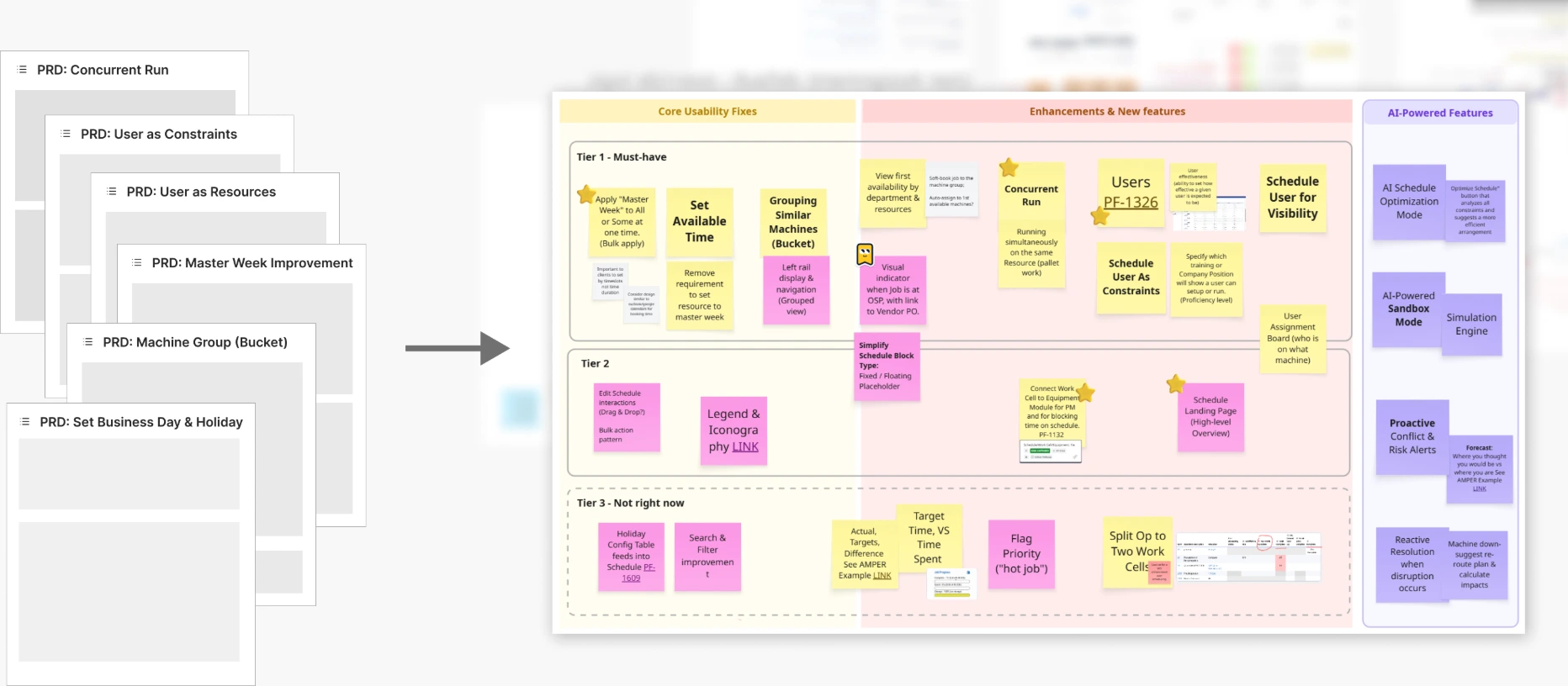
Frameworks before screens
My first deliverables weren’t screens. For a system this entangled the rules every screen hangs off are the design, so I wrote those first.
I gave the team one sentence to argue with: the schedule should express what a shop actually has, actually does and actually decides — and the interface should follow from that. The four chapters below are that sentence, one per pillar. Each runs the same way: what I heard, the model I chose, and what it produced.
How might we design the physics of a schedule before its pixels — so every screen is an expression of a rule the team already agreed?
-
Resources
What does this job need?
Answers: the machine is the only constraint.
Built: one resource tree; people, material and outside processing visible on every block; operators assigned natively.
-
Time
When can it actually run?
Answers: capacity by subtraction.
Built: working time declared positively, shift templates, and open capacity as a computed number.
-
Method
How does work land?
Answers: placement by hand.
Built: placement rules a solver can satisfy, routing order enforced, an opt-in solver, honest concurrency.
-
Visibility
Where is this job, and what’s happening?
Answers: one zoom level.
Built: one continuous canvas with the tree as its rows, a block language, a dashboard and a Kanban.
01Resources — what does this job need?
The machine is the only constraintF1departments and machine familiesF2people, material and OSP can’t be seen
Shops told me two things. They already think in departments and machine families, and most of what decides whether a job can run — people, material, outside processing — had no place on the schedule at all. One model answers both: a tree of everything the shop has, with every constraint a job needs shown on the block itself.
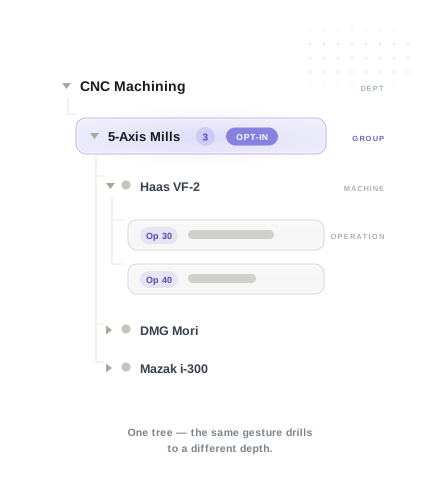
The resource hierarchy
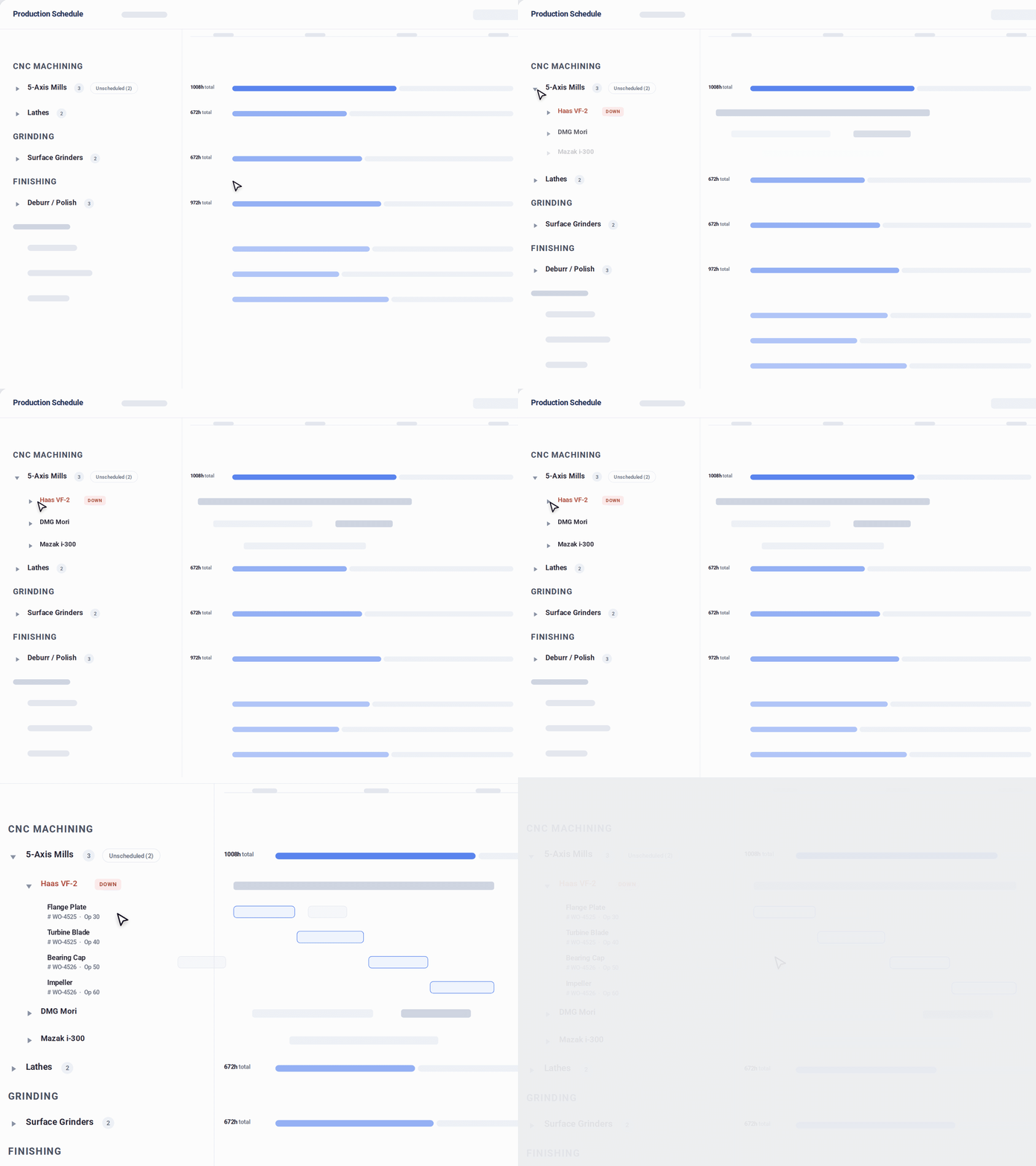
One tree feeds four places: the Gantt’s left panel, capacity roll-ups, group-level assignment, and navigation across every view. The group layer is optional — SME review taught me that a six-machine shop shouldn’t have to look at structure it doesn’t need. The tree is defined here and does its real work in Visibility, where its rows become the canvas.
Everything that can stop a job, on the block
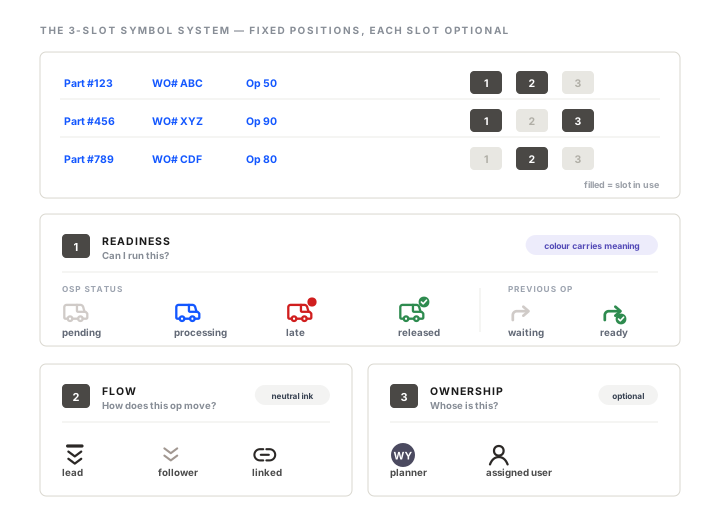
One shop sends 90% of its work out for outside processing. Another had operators who weren’t qualified for a setup. Material that hasn’t arrived stalls everyone. Legacy had no field for any of it, which is exactly why the whiteboards and spreadsheets existed. Each becomes a mark on the operation block — readiness symbols, the production-planning check, an owner — so “can this run?” is answered where the block is, not in a meeting.
People as a schedulable resource
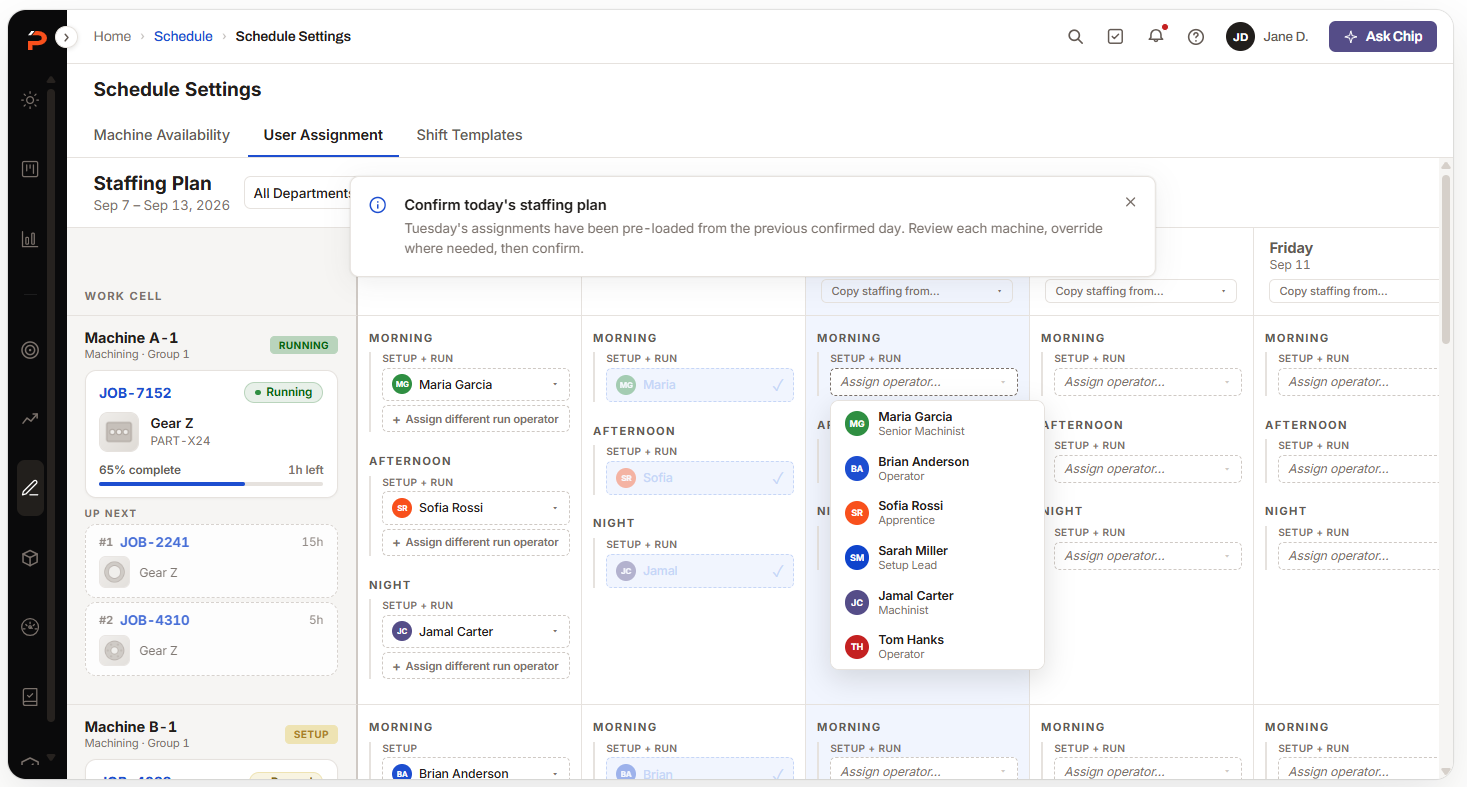
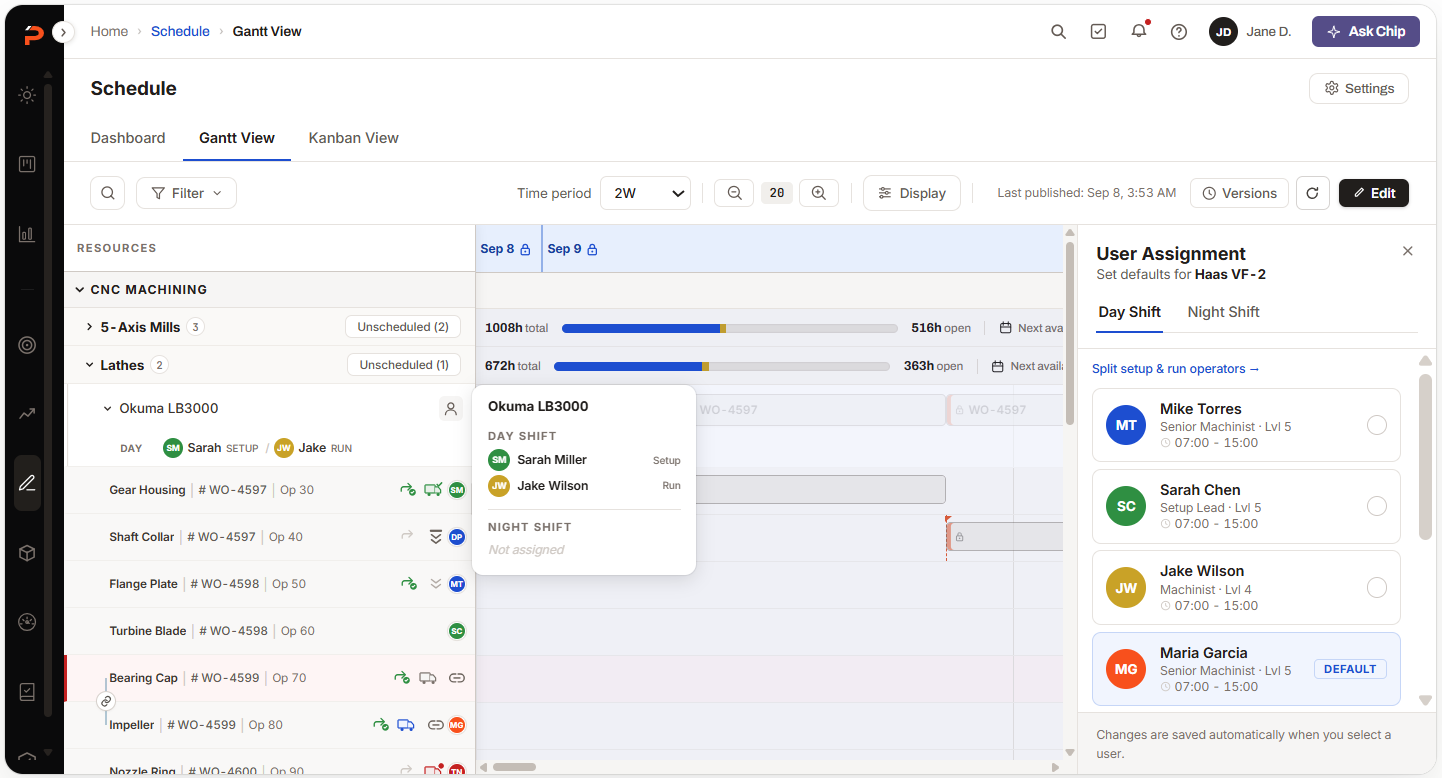
I treated people the way the schedule already treated machines. One board where an admin sets every assignment, syncing to the Gantt and to Kanban with per-operation setup and run states — the whiteboard photo from the onsite visit, turned into a screen. The SMEs’ first reaction was that this alone would close a lot of tickets.
02Time — when can it actually run?
Capacity by subtractionF3availability is the friction pointF4open capacity can’t be seen or sold
Availability was where schedulers spent most of their effort, and it drifted quietly; and nobody could see, let alone sell, the capacity that was open. They’re the same defect from two sides — time was declared by subtraction and never checked against anything. I made working time a positive object the solver plans against, so a start date, a finish date and an open gap all derive from the same fact.
Positive availability
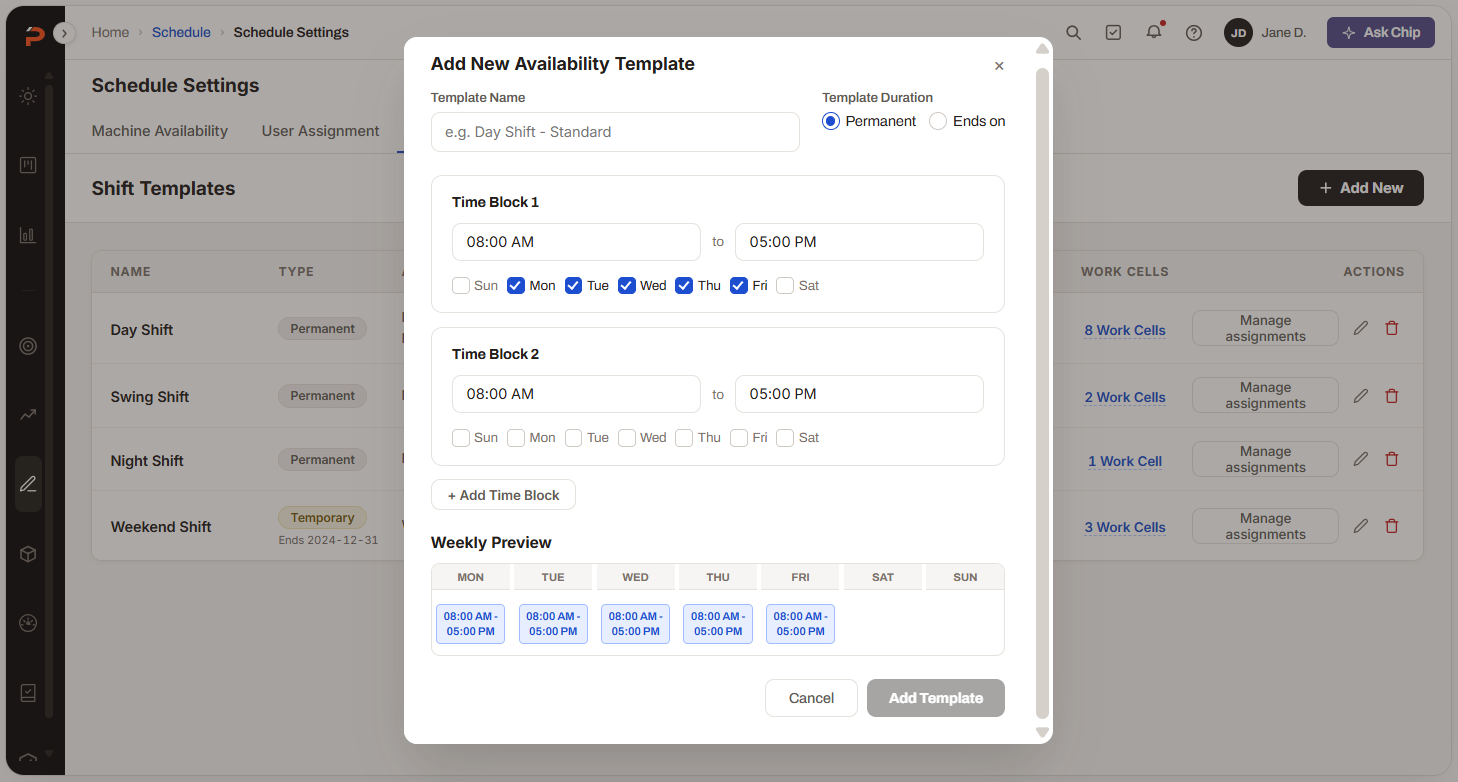
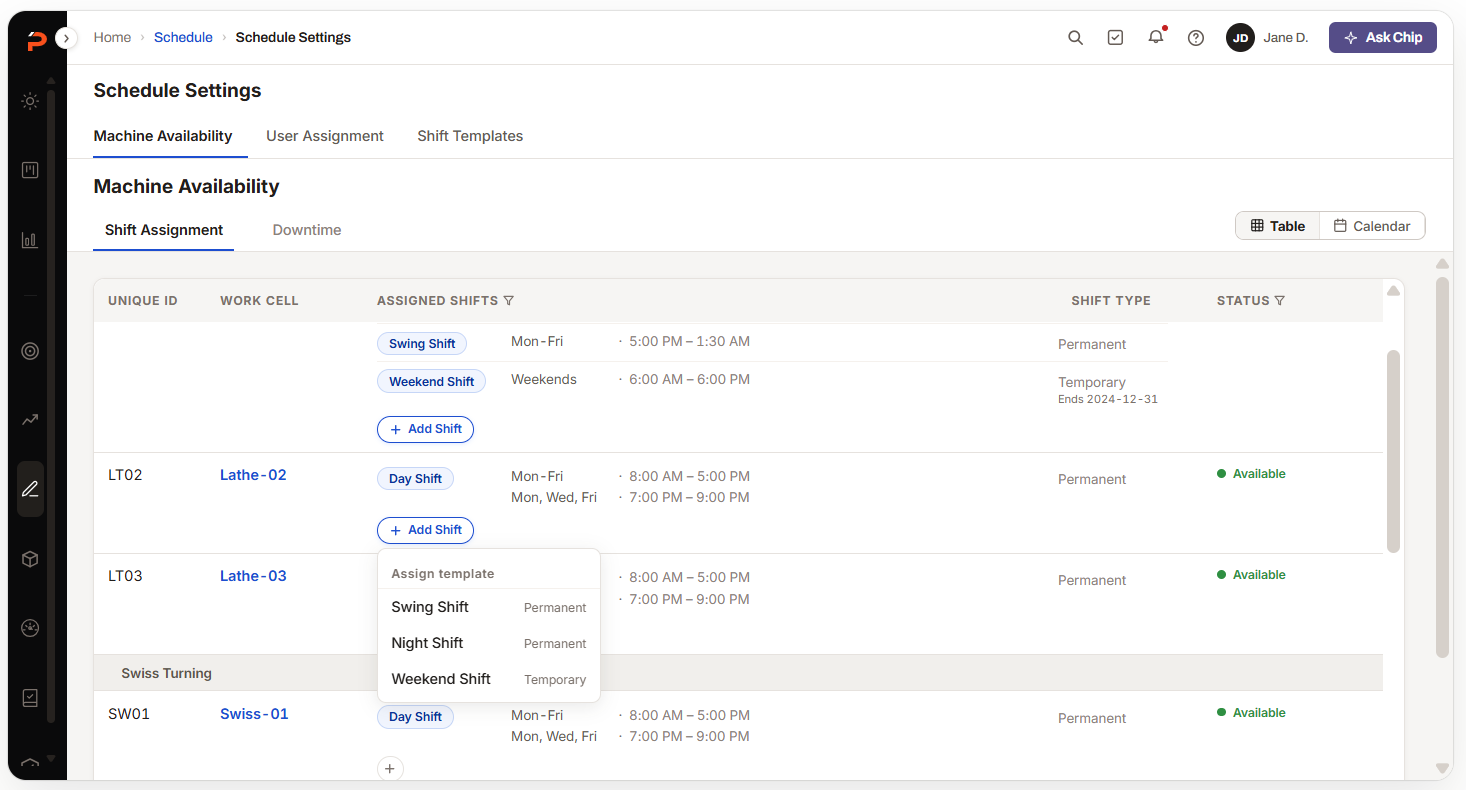
A shift template states a working day. Holidays and downtime are blocks laid on top of it, not carve-outs from it. Templates apply across the shop in one pass instead of one Master Week per cell — and downtime as a block matters again in Method, where “hold this time open” finally gets an honest home.
-
T1Availability logicBefore
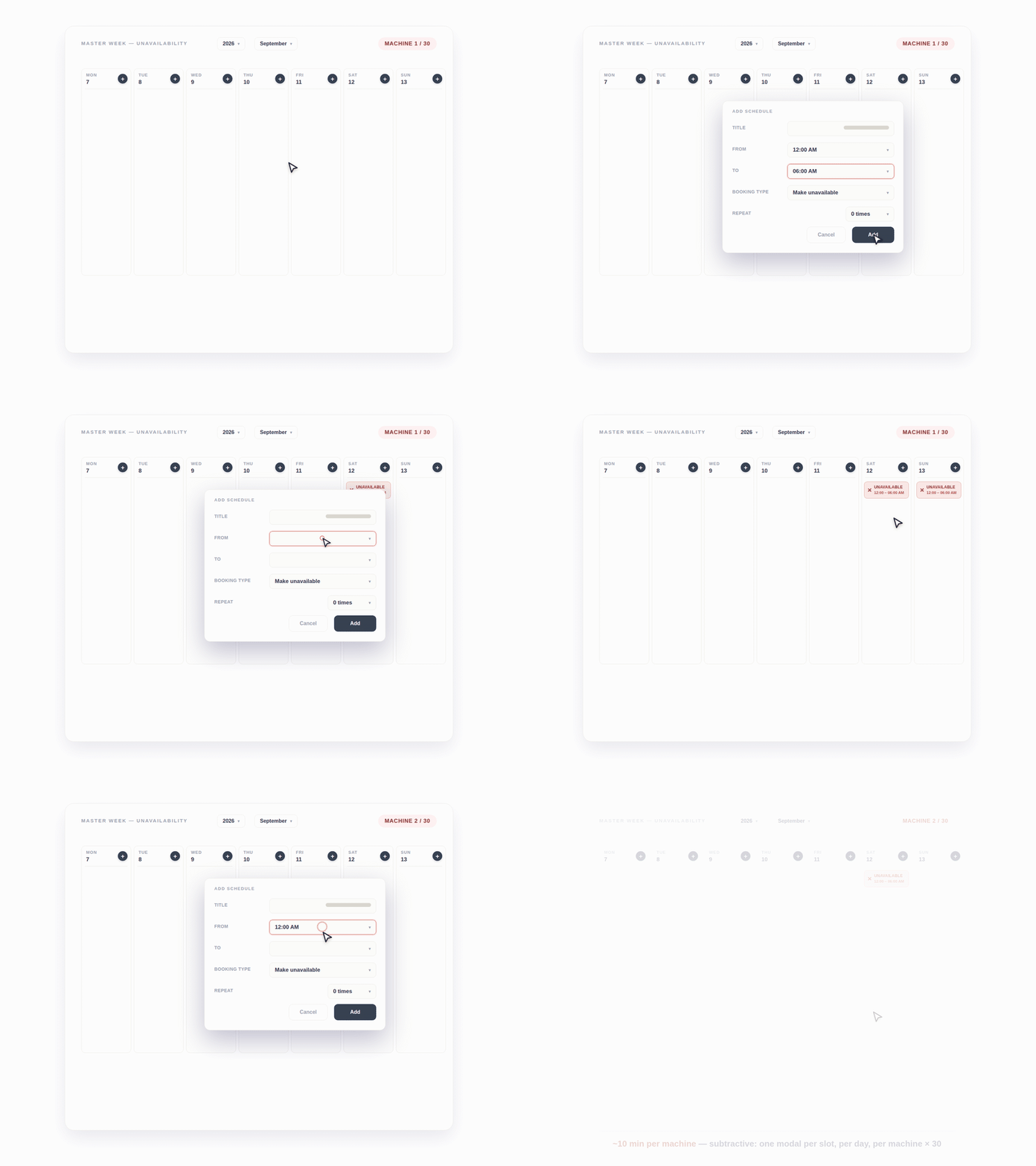
Subtractive. A Master Week per work cell where you mark what's unavailable — mental arithmetic, no bulk apply, and a silent two-year expiry.
After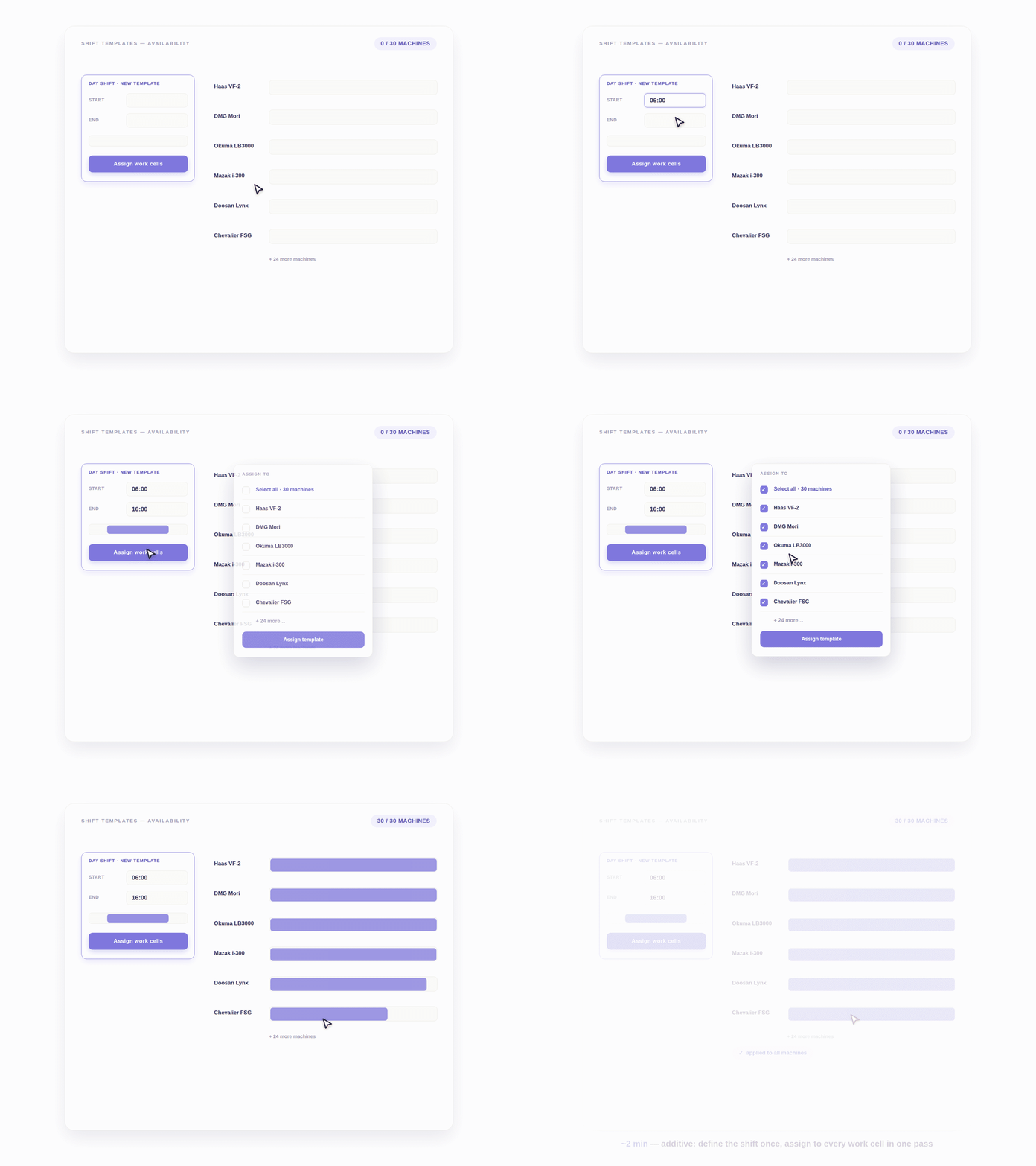
Additive. Define a positive working day, then drag-and-apply shift templates across the shop.
Availability setup. Bulk apply means a 30-machine shop configures once, not thirty times.
Capacity you can see — and sell
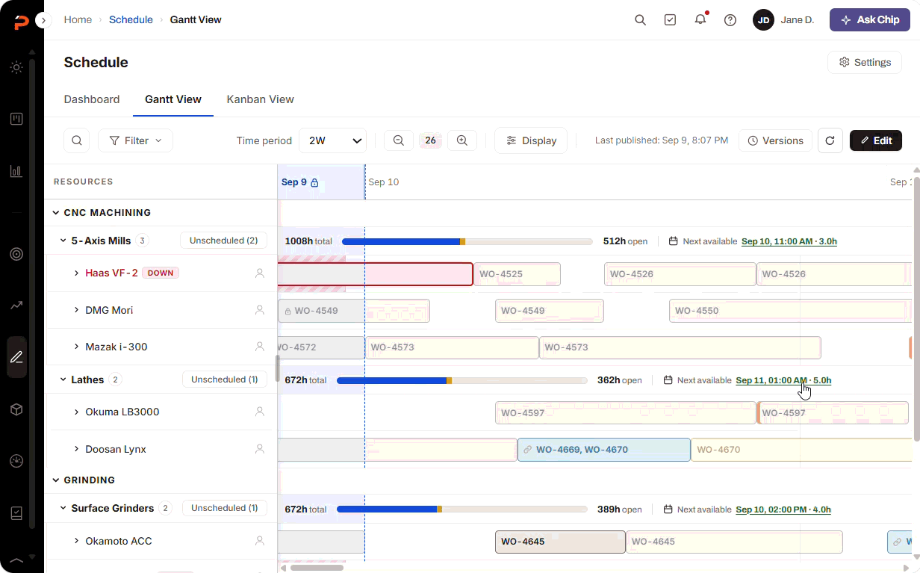
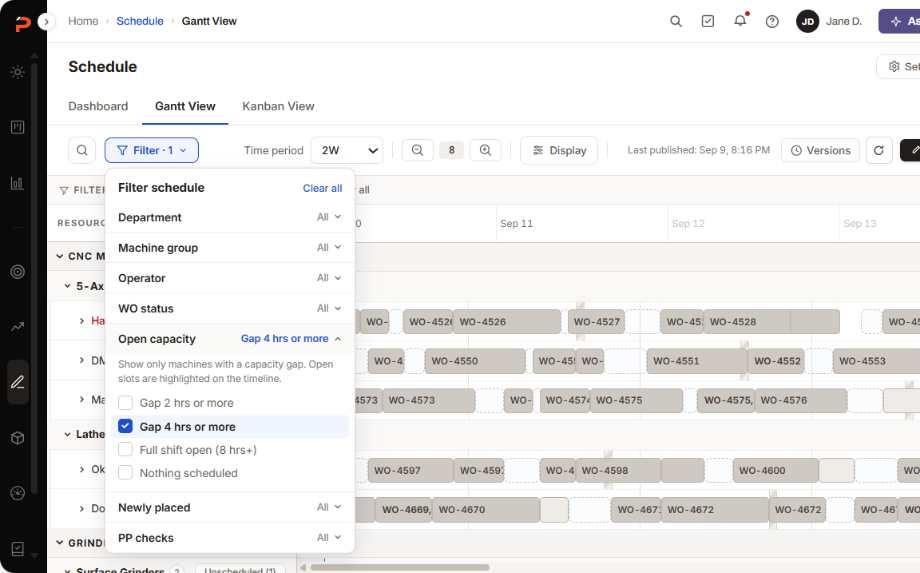
Because availability is positive, open capacity becomes a number the system computes: hours open per machine, rolled up to group and department, and a next-available time on every row. That’s what CNC Swiss meant by selling the gap — quoting a delivery from real open machine time instead of a guess — and it’s why the capacity bars and the utilization figures can be believed: they come from the same declared time the schedule is placed against.
03Method — how does work land?
Placement by handF5op sequence enforced by handF6concurrent running modeled wrong
Op sequence was enforced by hand and concurrency was modeled wrong, and behind both sits the complaint the NPS comments make most often: the board can’t be trusted, because it’s full of decisions nobody can explain. Schedulers were doing the solver’s job by hand, and every legacy control existed to help them do it.
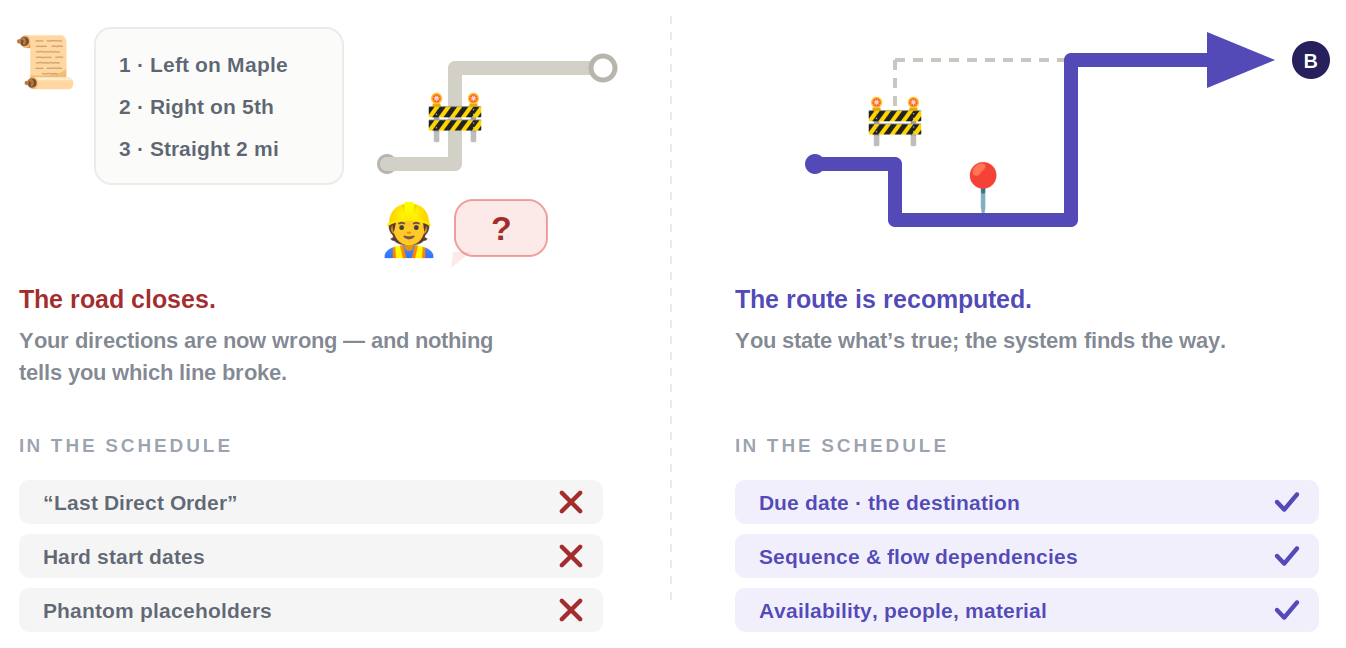
A schedule isn’t a document you maintain. It’s an answer the system recomputes from facts you give it.
So I drew one line: store facts and commitments, derive everything else. A hard start date was neither — it was a stored answer, which is why it went stale.
Ops of a job always run in routing order.
Legacy could schedule Op 20 before Op 10 — the second row above — and warn you with a ghost block, a system telling you your own plan was impossible. If something can be proven unbuildable, it shouldn’t be expressible. I deleted the state instead of improving the warning.
The solver is opt-in
Legacy ran one global rule on top of per-cell settings; when they disagreed, jobs silently failed to schedule.
ProShop’s own help docs told customers to leave deburr, assembly and inspection off the schedule — a product admitting it had the wrong model. Now each cell declares whether placement is a question at all: an Optimized cell lets the solver place just-in-time; a Manual / FIFO cell is a queue the scheduler owns, and the solver never touches it.
What was retired
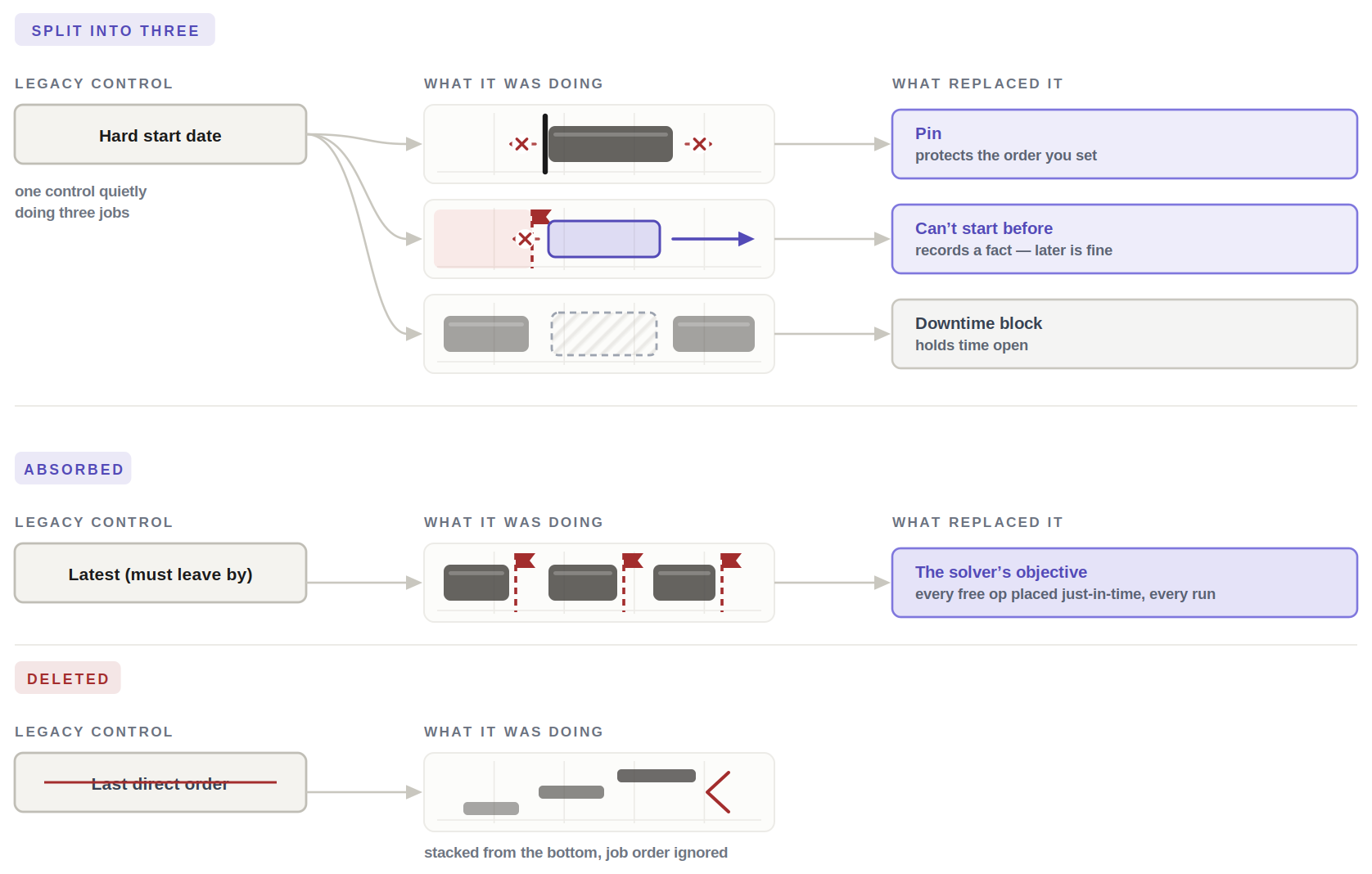
Freezing a job at a clock position is what fought the optimizer. Appending new work to the tail was the other change, and the trade is honest: an appended job can land past its date, and a wrong answer you can see beats a right answer you can’t.
- A fact about the world — can’t start beforeForbids earlier, leaves later free — so it can never make the board unsolvable.
- A decision about order — a pinProtects sequence, not clock time, on a rolling window. A stored date is maintenance somebody forgets.
Engineering solves sequencing with CP-SAT from Google’s OR-Tools, which set my constraint as a designer: every rule I wrote had to be something the solver could satisfy, or report as infeasible.
Concurrency, modeled truthfully
Stacked full-length blocks give every concurrent job the wrong end time, and the on-time-delivery number downstream inherits the error. The rebuild computes a block’s length phase by phase, so a bar’s width is what actually happens on the machine.
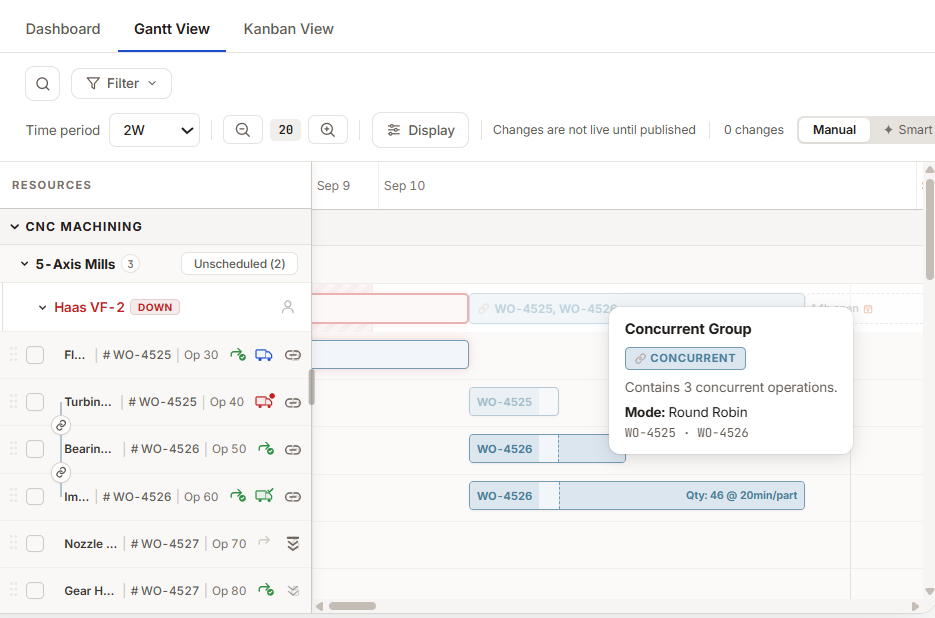
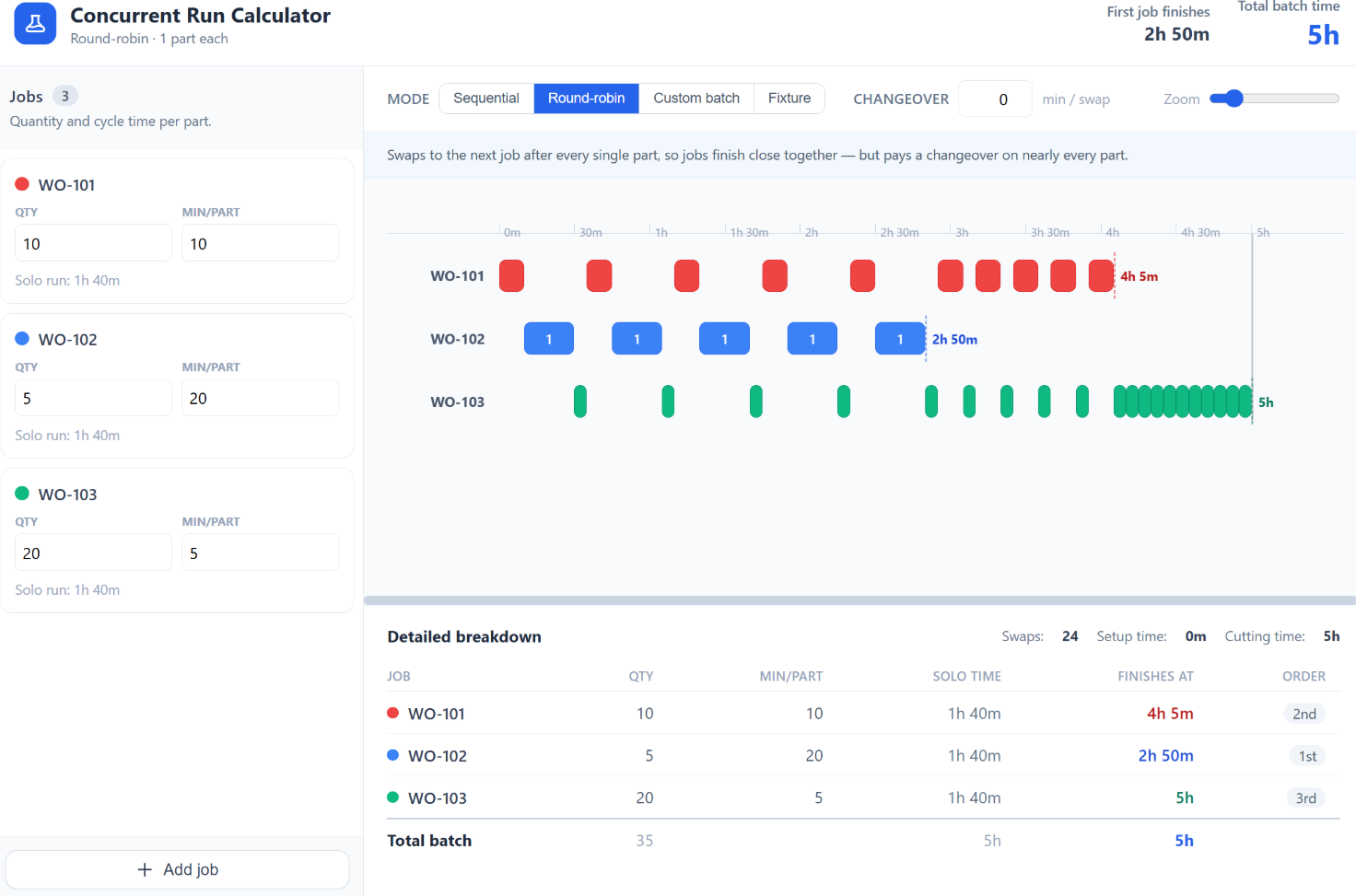
I built it as a standalone tool first — V1 round-robin, V2 per-job batch quantities after shop feedback. Getting the math right on its own is why the Gantt bars could be trusted later.
04Visibility — where is this job, and what’s happening?
One zoom levelF7one machine at a time, never the shopF8no overview, no drill-down
You saw one machine at a time, and there was no overview and no way down. Both are one missing idea: altitude. Everything above — the hierarchy, the availability, the placement rules — is drawn on a single decision about what a schedule looks like, then read at three zoom levels: the shop, the canvas, the block.
A canvas, not a grid
Whether the schedule is a grid of machine cards or one continuous canvas decides how every work cell is shown, so I settled it first. I rejected the card grid on evidence, not taste: finding open capacity was a scavenger hunt, and the grid is what made it one. I built the side-by-side prototype so the argument could be tried rather than described.
-
00Grid to flowBefore Grid
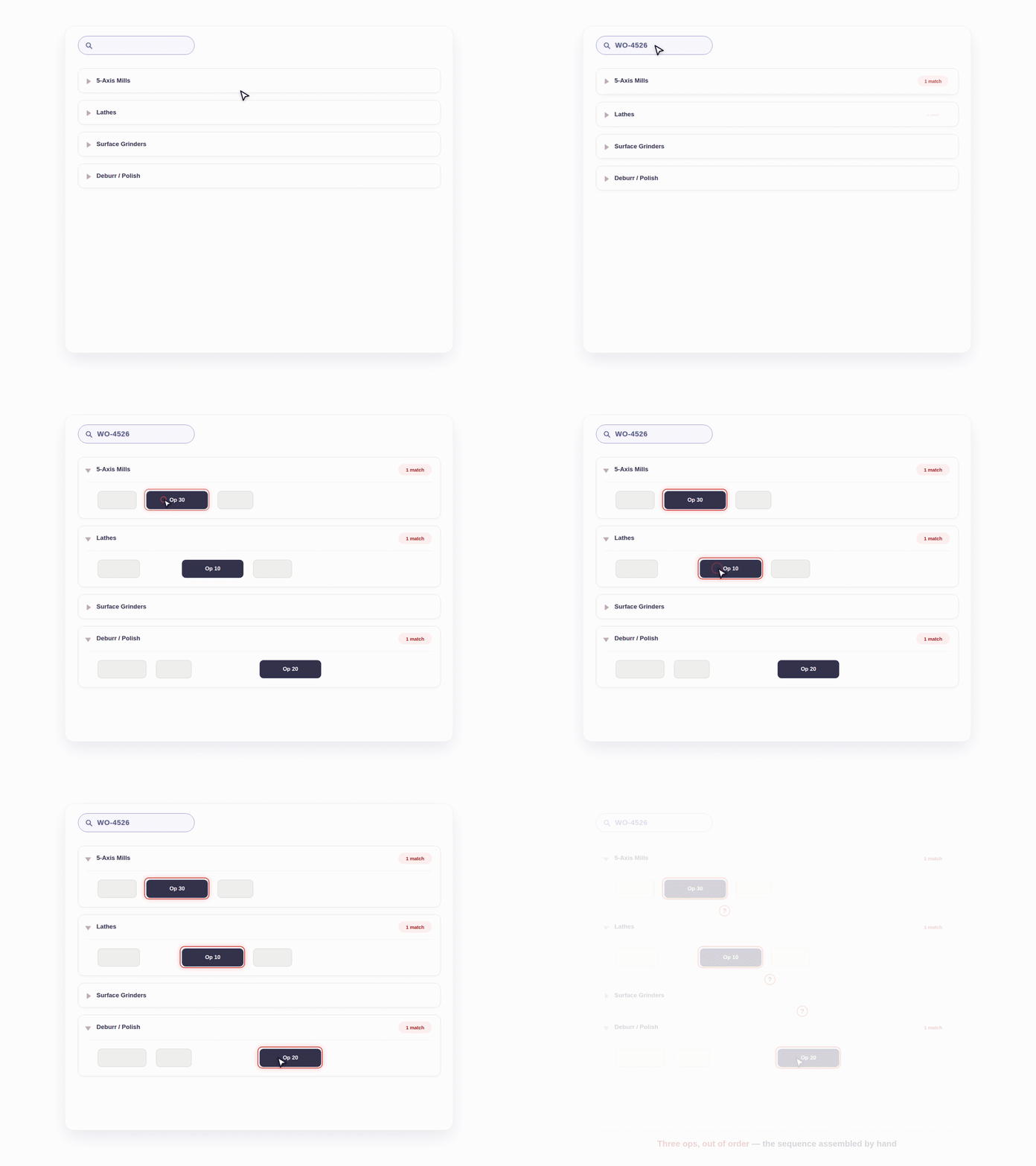 After Flow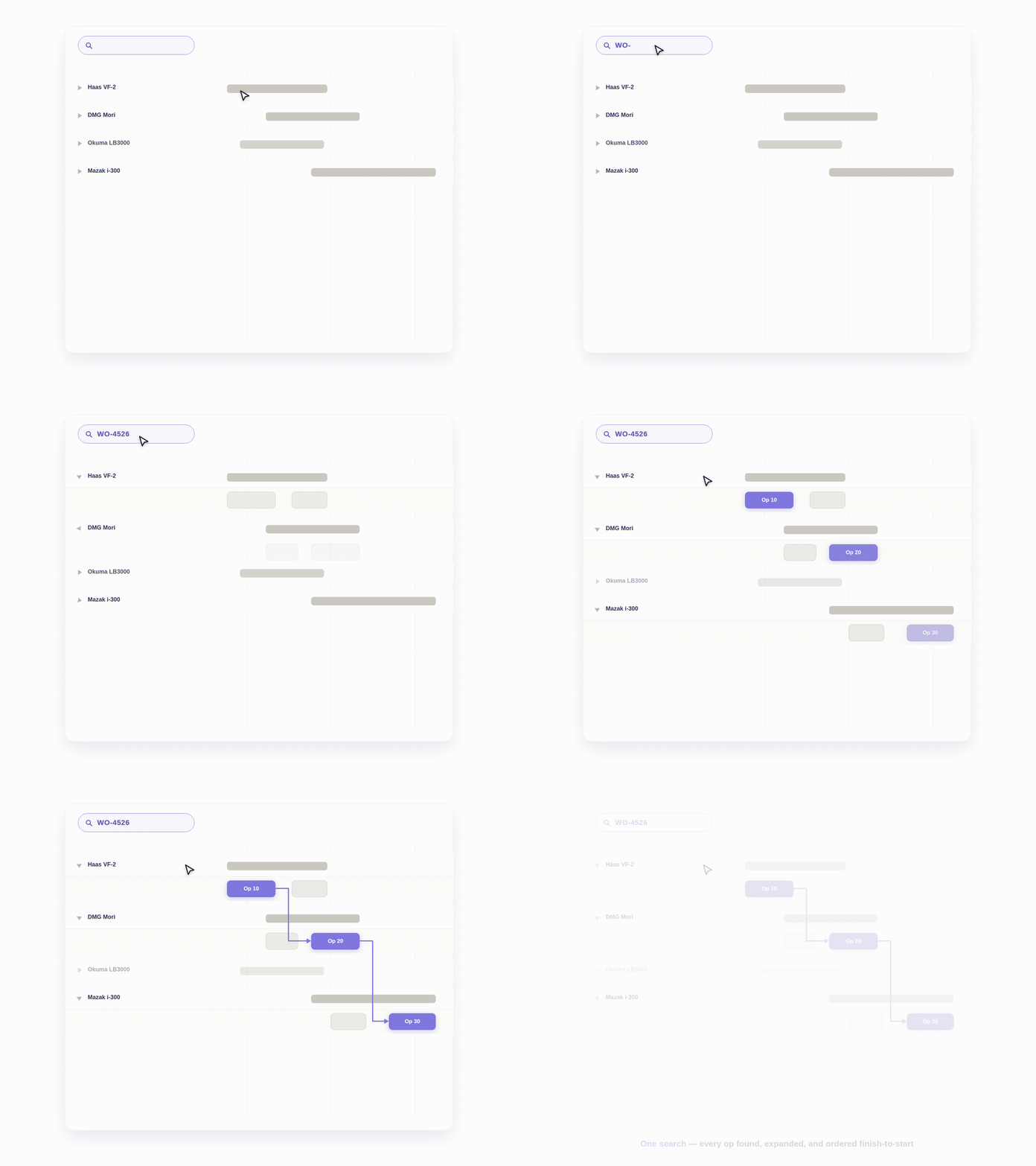
Altitude 1 — the shop, the view from above
Shop owners’ complaint was that every statistic lived at the deepest level. The KPI page is the missing altitude — utilization, on-time delivery, what’s at risk and where the bottleneck is — and the Kanban is the whole-shop view for people who need to see rather than edit.
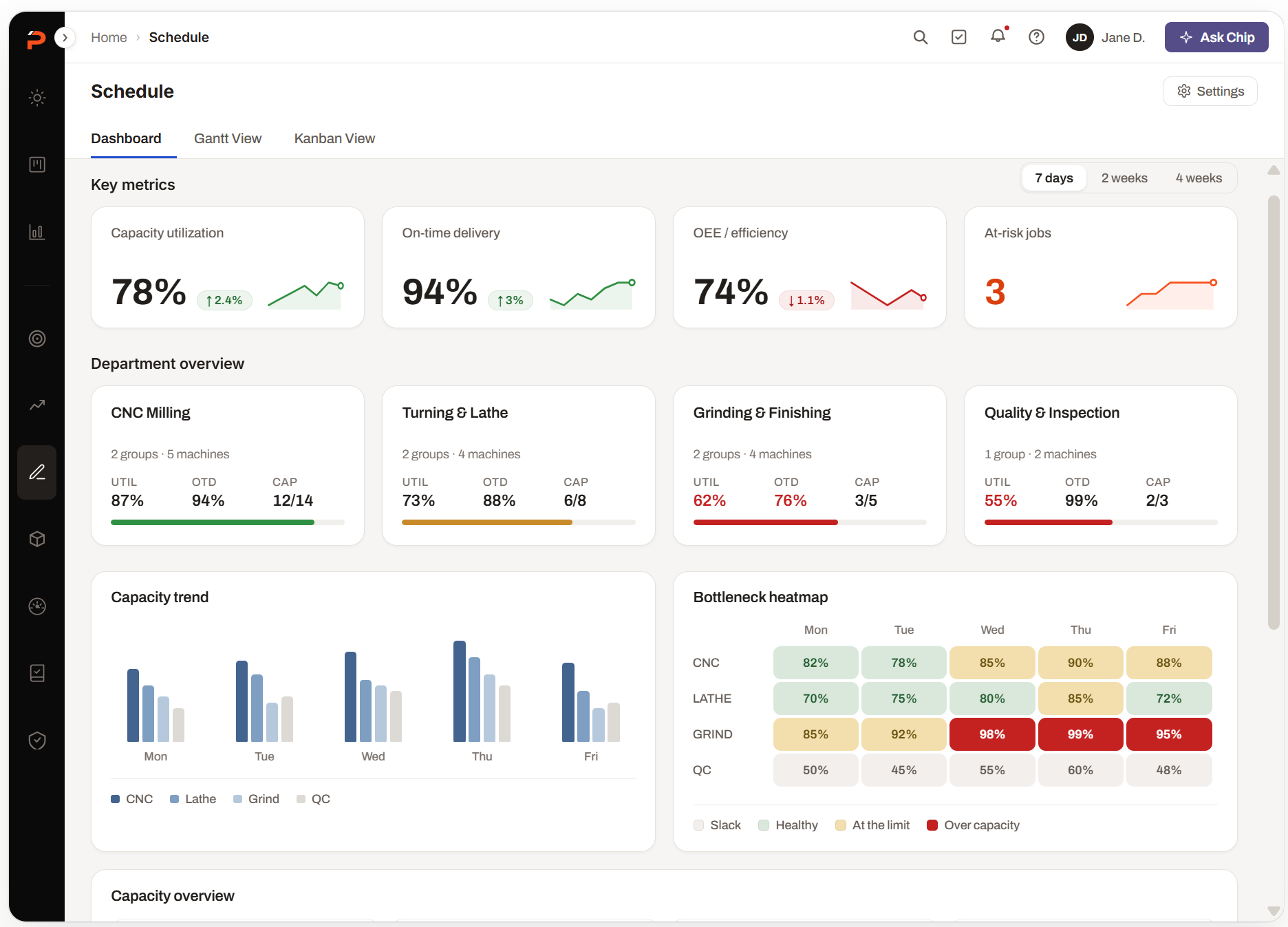
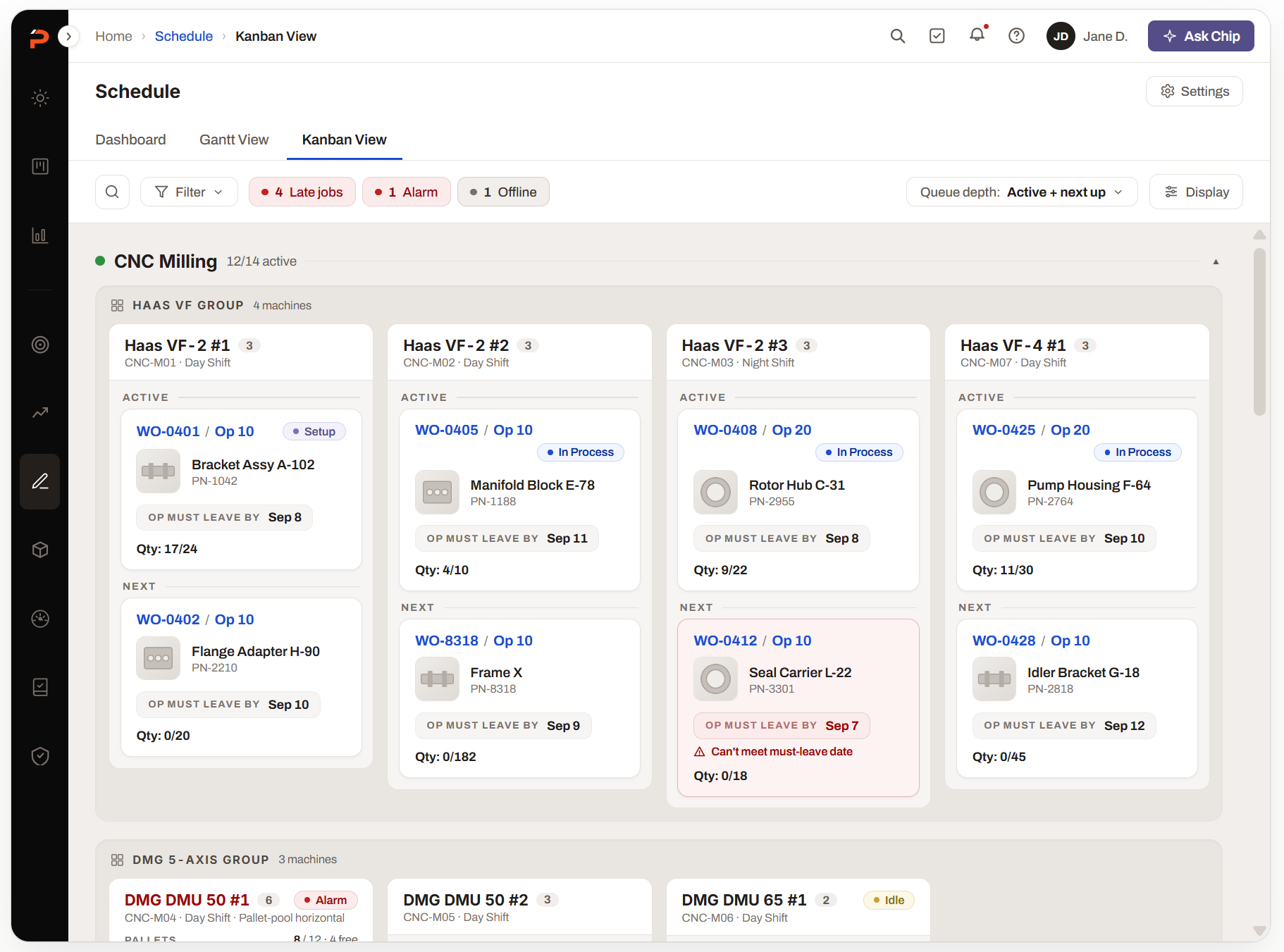
Altitude 2 — the canvas, and the tree as its rows
The tree from Resources becomes the rows of the canvas. Collapse a department and you get a summary strip, so a closed row never hides that it’s busy; expand it and the machines appear on the same time axis. One rule governs the whole workspace, short enough to hold in your head: orientation left, action center, depth right, attention on top.
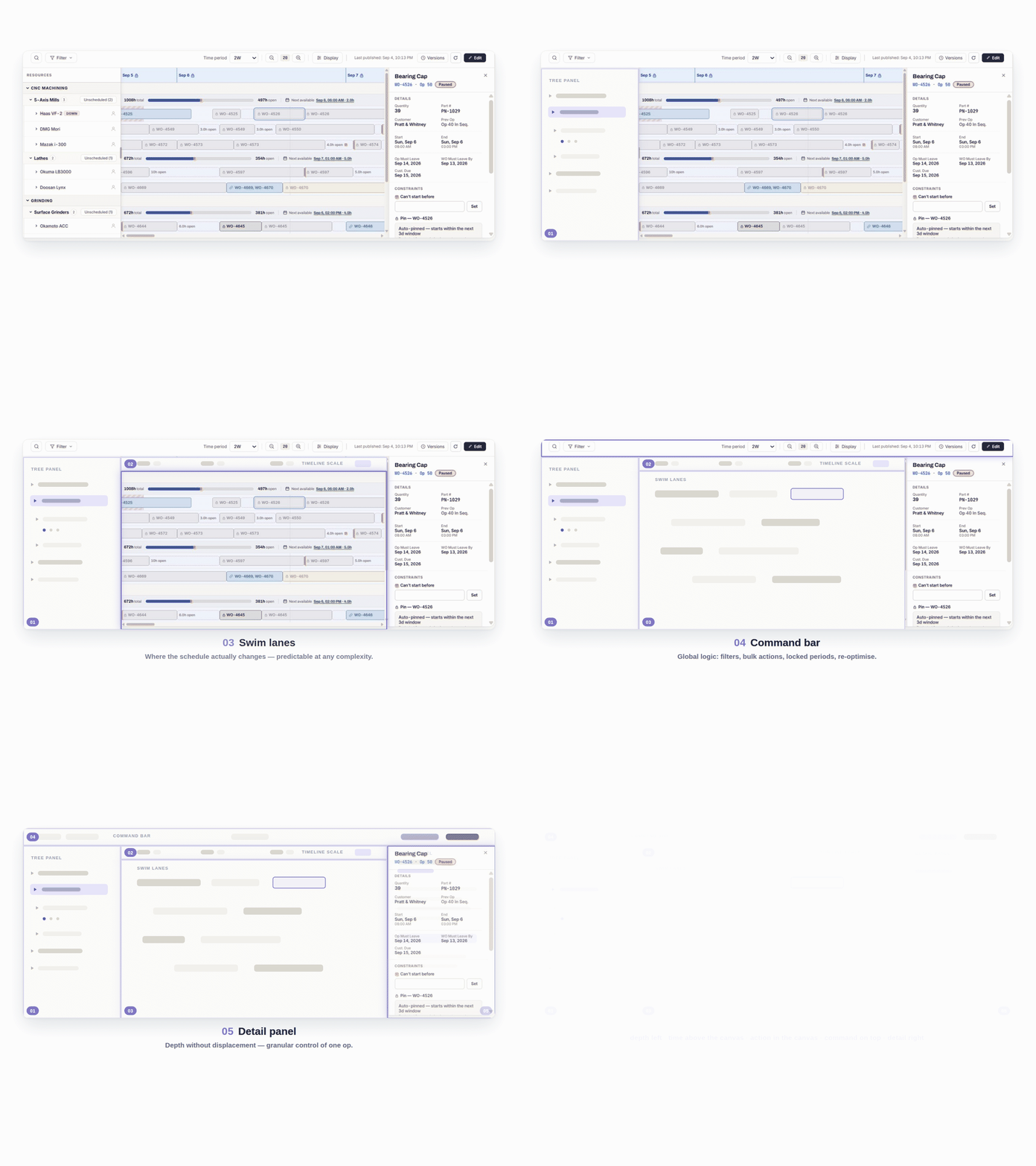
Altitude 3 — the block, one glance, three questions
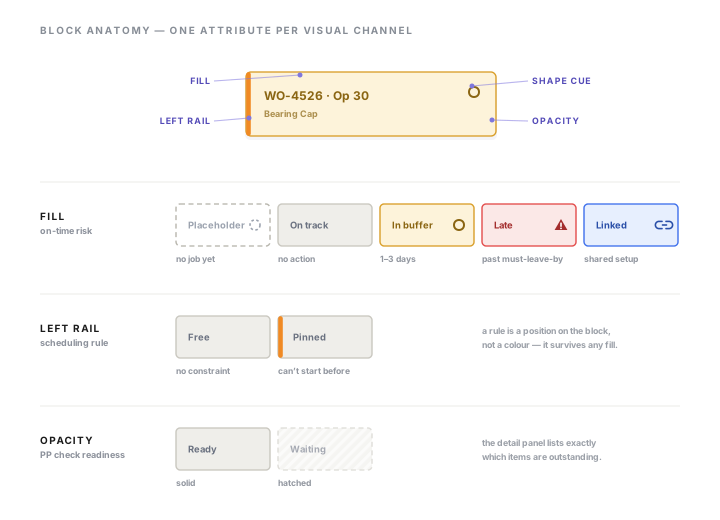
A block has to answer three questions without being opened, and each answer has its own visual channel so two states can never contradict each other. Fill carries on-time risk. The left rail carries the scheduling rule as a position, so it survives any fill. Opacity carries readiness. And three fixed symbol slots answer can I run this?, how does it move? and whose is it? — one from each pillar.
I kept the legacy color vocabulary on purpose. Color is the schedule’s language, and the research said users love it and distrust it in equal measure; replacing it would have cost the love and kept the distrust. So color is confined to the one slot where it means something — readiness — and structure is drawn in neutral ink.
Reviewed by experts, then tested with customers
Two loops, and they catch different things. Internal domain experts attacked the model on paper before it was built; customers used the real thing while it was still being built. The useful output of a review is what it changed, so both columns are here — including the one where I was wrong.
Loop 1 — SME pilot review
January 2026, with colleagues who have run shops. The framework was the thing under review, not the screens, which is the only reason a model error could still be cheap to fix.
Loop 2 — the Client Advisory Board
A standing call where early-access features are shown on a live product instance, not a prototype. Shops react differently to software they can picture using on Monday: a click-through gets opinions, a working instance gets objections.
The same shops see the module every few weeks, so a change lands in front of the people who asked for it while their reasoning is still fresh. The interview cohort became this room — which is also why the beta pipeline was warm before beta existed.
- What the SME loop catches
Model and compliance errors — the things only visible to someone who knows how a shop gets audited. Cheap here, expensive after build.
- What the CAB loop catches
Scale and habit — whether a real 30-machine week survives the interaction, and whether the vocabulary matches what the floor already says.
One system, five surfaces
Phase 1 ships as one scheduling system, not a bundle of pages. The four chapters stack into three layers — declare what the shop has and when it runs, decide how work lands, see where everything is. Screens for reading are kept apart from screens for acting, on purpose.
-
Top · see · Visibility
KPI landing page & Kanban view
Where is the shop, and what’s happening? Two read altitudes for people who look rather than edit — the dashboard for managers and owners, the Kanban for leads and operators. No scheduling actions on either, deliberately.
-
Mid · decide · Method
Gantt workspace
How does work land? Where the placement rules get exercised — floors, pins, the opt-in solver — and where conflicts get resolved. The one screen a schedule is committed from.
-
Mid · decide · Resources
User assignment board
What does this job need, and who? The admin’s single source of truth for people. Defaults set here cascade down to the Gantt, where the scheduler sees who is on a machine per shift and can override one operation without editing the plan.
-
Base · declare · Time
Availability & shift templates
When can a machine actually run? Declared once, positively, in settings where it belongs. Nothing above works if this is wrong.
One work order, across all five
The stack above is the system at rest. This is one job moving through it, from the shift template that defines its machine’s day to the on-time-delivery number it finally moves. “Where is this going next?” stops being a question you trace across screens.
- Declare · TimeShift templateDefines the machine’s working day
- Decide · MethodLands on the GanttOptimized cell, just-in-time slot
- Decide · ResourcesOperator assignedOn the board; syncs to every view
- See · VisibilityAppears on KanbanIn the operator’s column, with readiness signals
- See · VisibilityFeeds the KPIsCompletion lands in OTD and utilization
The AI layer: designed for, not painted on
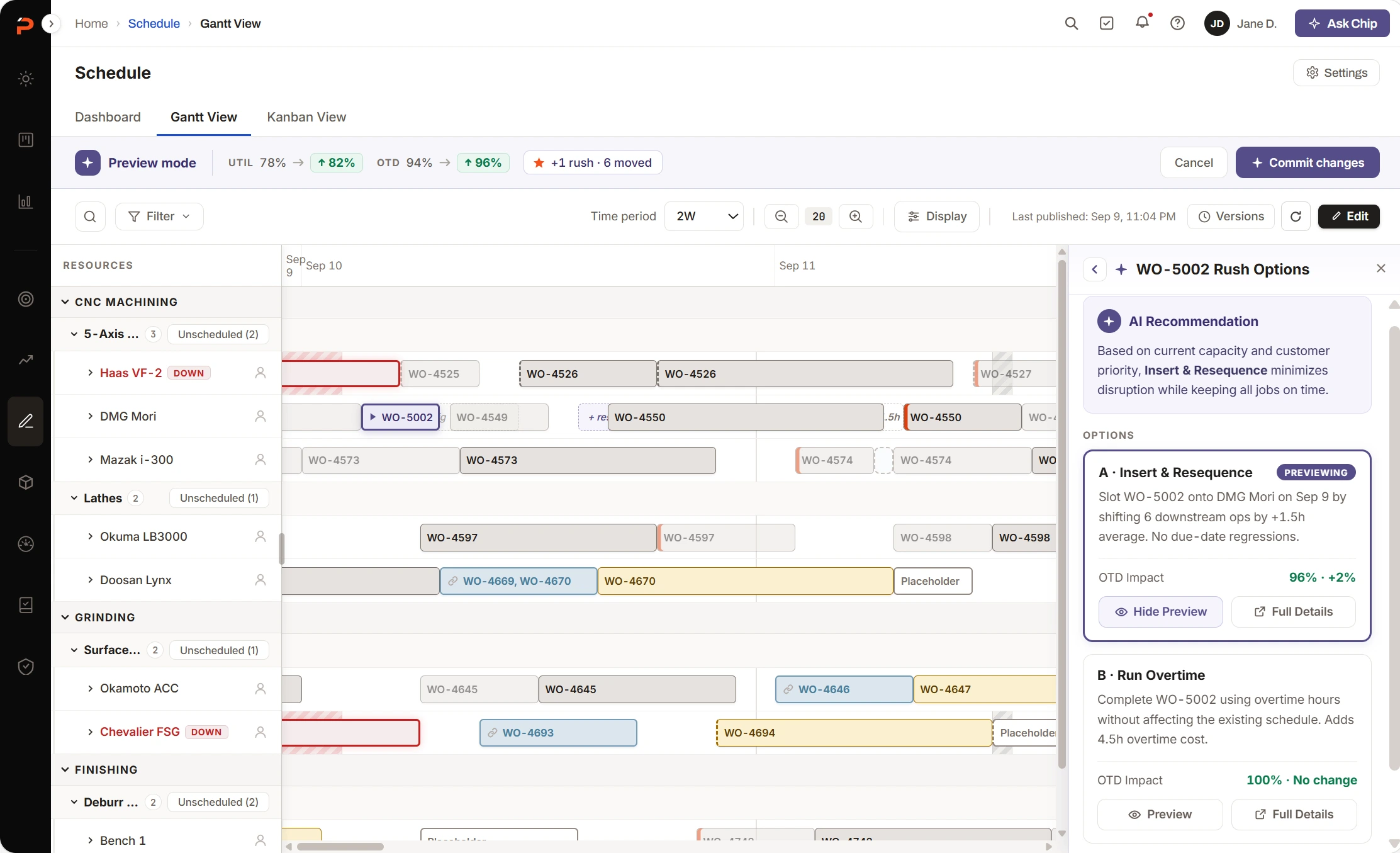
Everything above is the foundation; this is what it was shaped to carry. The AI scheduling layer is fully designed and planned as a premium capability after GA. Rather than ship half of it, I’d rather show that the AI vision came first, and its requirements are visibly wired into the foundation.
The three levels came out of clustering the AI sprint’s raw idea list.
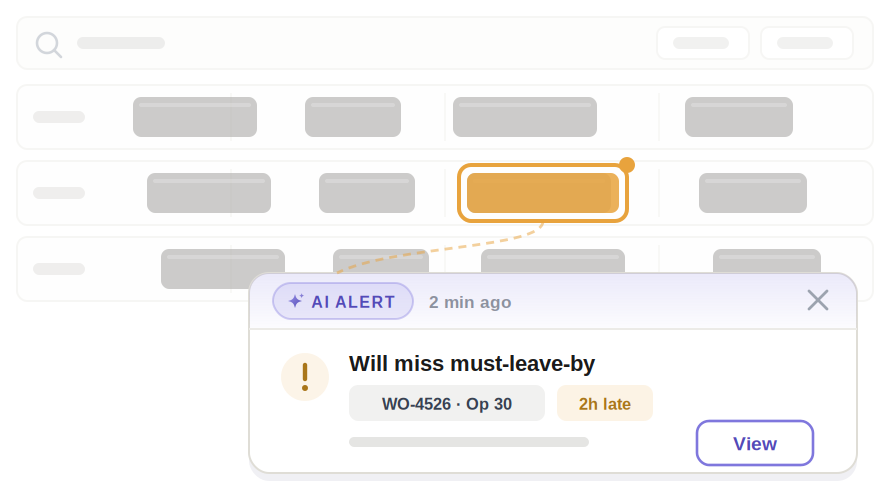 Level 01 · informProactive alertsThe system speaks; the human acts.
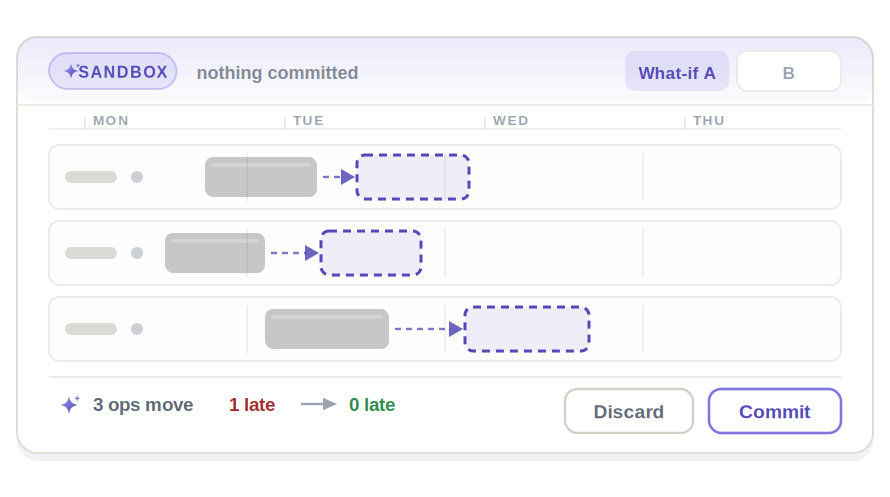 Level 02 · rehearseSandbox simulationA wrong answer here costs nothing.
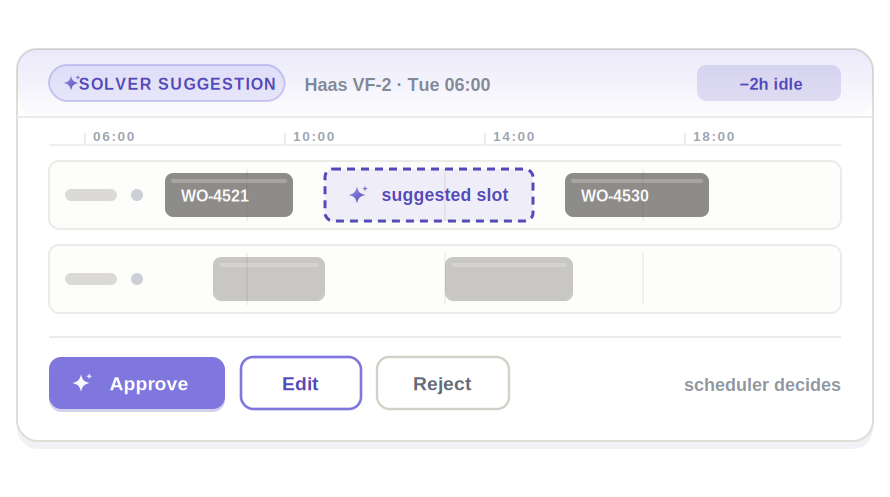 Level 03 · actOptimization suggestionsThe solver proposes; the scheduler stays the author.
Four things are in the live product only because the AI layer was already on the table: Scheduling Mode, the per-cell contract for where automation may act; a solver that fires on placement and on request, never continuously; an audit trail that is both the compliance story and the training signal; and reserved slots in the block badges, side panel and attention banner. All four were cheaper to decide before the build than to retrofit after a complaint.
Measurement Baseline only
Beta begins September 2026. Every number here is a legacy baseline or a target — the results column stays empty until real schedulers have run real shops on it.
| Metric | Legacy baseline | Target | Post-beta |
|---|---|---|---|
| Active editors per account | ~1.7 (294 editors / 174 accounts) | 2× within 90 days of GA | — |
| Schedule users who edit | 7.5% | Meaningfully up — shared maintenance | — |
| Non-scheduler roles engaging | ~0 (view-only by design) | 30% monthly | — |
| Account activation | net-new | 60% in 30 days | — |
| Scheduler-persona weekly actives | net-new | 50% in 90 days | — |
| Beta accounts in weekly use | — | 8+ | — |
Baselines: Pendo, 22 Jul – 20 Aug 2026.
At beta scale, percentages are noise. With roughly eight accounts the results column will use counts and cohorts — “six of eight beta shops had three or more roles active weekly, against 1.7 editors on legacy” is honest at small n. Behavioral evidence carries the beta story: a shop retiring its whiteboard or its Excel monitor. Full metrics land at GA.
Already realized Structural
The placement rules and the audit trail are the trust and data foundation the AI layer is being built on — designed once, for both the free foundation and the premium capability. That doesn’t depend on adoption to be true.
The interview cohort became the beta and reference pipeline, which is the cheapest research dividend I’ve had on a project.
Reflection
-
01
Design the physics before the pixels
The placement-rules document took more risk out of this project than any mockup. Every screen after it was drawing rules we’d already agreed, which is why estimation stopped being a negotiation.
-
02
Scope is a design deliverable
“Foundation before intelligence” was the most useful argument I made, and it wasn’t a screen. Seeing it wasn’t the hard part. Carrying it to a VP as something concrete enough to decide on was.
-
03
Abstractions must degrade gracefully
The hierarchy was right for 34 machines and wrong for 6. The optional group layer came from letting SMEs attack the framework instead of admire it — scaling down matters as much as scaling up.
Next case study